5-Stage Website Information Architecture for Designers & Site Owners
5-Stage Website Information Architecture for Designers & Site Owners

Website information architecture is the strategy layer that organizes your content, labels, and navigation so people find what they need without hunting for it. Done well, it shortens the path between a visitor’s question and your conversion pages. The most reliable approach isn’t guesswork. Its structure is built from real user research and confirmed through testing before a single wireframe gets built.
TL;DR:
- An effective website architecture depends on thorough user research and content categorization before designing navigation, labels, and search systems.
- Testing methods like card sorting and tree testing identify structural issues, improve findability, and prevent costly fixes after launch.
- Structuring pages so critical content like pricing and contact info is within three clicks enhances conversions and user experience.
- Proper IA enhances SEO by creating shallow hierarchies, descriptive URLs, internal linking, and technical signals like XML sitemaps.
- Common mistakes include overloaded menus, orphan pages, internal jargon, and buried conversion pages, which are easily fixed through audits and strategic planning.
Table of Contents
- What Does Website Information Architecture Actually Include?
- How Do You Build an Information Architecture From Scratch?
- What Are the Core Principles of Good Website Structure?
- Is Information Architecture the Same as a Sitemap?
- How Do You Test an Information Architecture Before Launch?
- How Does Information Architecture Affect SEO?
- What Are the Most Common IA Mistakes?
- What Deliverables Come Out of an IA Project?
- Why This Work Rarely Gets the Attention It Deserves
- Ready to Fix Your Site’s Structure?
- Sources
- FAQ
What Does Website Information Architecture Actually Include?
Four systems make up any working information hierarchy, and mixing them up is where most site owners get stuck.
- Organization systems group content into categories people actually think in, like hierarchies by topic or hub pages that gather related services.
- Labeling systems are the plain-language words on your menus. “Solutions” means nothing; “Pricing” and “Case Studies” mean something.
- Navigation systems come in three flavors: global (the header that appears everywhere), local (sub-navigation within a section), and supplemental (footer links, related-content modules, breadcrumbs).
- Search systems matter once your content library grows past what a menu can reasonably expose, especially for catalogs or resource libraries with dozens of entries.
Getting these four right does more than help visitors. It also gives search engines a clean map of how your pages relate, which is where organization systems start paying dividends beyond the user experience.
How Do You Build an Information Architecture From Scratch?
Rebuilding a site’s structure is not a creative exercise. It’s a research process with five distinct stages, and skipping any of them shows up later as confused users and rising bounce rates.
- Research. Talk to actual users, review analytics for your highest-traffic and highest-drop-off pages, and prioritize the personas who convert most often.
- Categorization. Run a full content inventory, then group pages by theme and user intent rather than by department or org chart.
- Labeling. Write plain-language menu names that match how visitors search, not internal jargon your team uses in meetings.
- Mapping. Translate categories into a sitemap, user flows, and a URL structure that mirrors the hierarchy.
- Testing. Validate the structure with card sorting and tree testing before development, then fix what breaks.
This sequence follows the same five-stage model CXL outlines for optimizing IA for user experience, and it works whether you’re planning a five-page site or a 500-page catalog.
What Are the Core Principles of Good Website Structure?
A handful of rules of thumb save you from most structural mistakes before they happen. Practitioners often cite eight guiding principles, covering ideas like consistent labeling (the same term means the same thing everywhere), disclosure (show just enough to help someone decide whether to click deeper), and the front door principle (assume visitors can land on any page, not just your homepage).
In practice, that translates to a few concrete targets:
- Keep pages that drive revenue, like pricing or contact, within a few clicks of anywhere on the site.
- Limit your header navigation to a modest number of items; more than that and visitors start skimming instead of reading.
- Choose hub-and-spoke structures when you want topical authority on a subject; use siloed sections when audiences genuinely don’t overlap, like separate product lines.
- On mobile, avoid nested flyout menus. Touch interfaces don’t support hover, so a landing page with clear local navigation usually beats a deep dropdown.
Pro Tip: If you’re debating between two menu labels, test both with five real users instead of debating it internally for another week. A five-minute conversation settles arguments that meetings can’t.
Is Information Architecture the Same as a Sitemap?
No, and conflating the two is the most common mix-up in this field. Information architecture is the strategic logic behind how content relates. A sitemap is one artifact that visualizes that logic, and navigation is the interface that exposes a slice of it to visitors.
- IA answers “how should this content be organized and related?”
- Sitemap answers “what does that organization look like as a diagram or file?”
- Navigation answers “what part of that structure does the visitor actually see and click?”
A sitemap without underlying IA work will not scale. It might look tidy on day one, but it has no rules for where new content goes six months later. Sitemaps earn their keep in planning conversations, developer handoff, and as XML files that help search engines crawl efficiently. Navigation, meanwhile, only needs to show what matters most in the header, keep secondary utility links in the footer, and reserve local navigation for sub-sections a visitor has already committed to exploring.
How Do You Test an Information Architecture Before Launch?
Three methods catch most structural problems before they become expensive to fix.
- Card sorting. In an open sort, participants group content and name the categories themselves, revealing how they naturally think about your topics. In a closed sort, they place items into categories you’ve already defined, which tests whether your proposed labels make sense.
- Tree testing. Strip away all visual design and give participants a bare-bones outline of your proposed structure, then ask them to find a specific item. This isolates findability from design distractions.
- Simple usability tasks. Ask five to eight people to complete a real task, like “find our refund policy,” and time how long it takes along with where they get lost.
Card sorting and tree testing are the two methods practitioners lean on most for validating labeling and findability before committing to development. Track three metrics: success rate (did they find it?), time-to-find, and the specific wrong turns people took. A 60% success rate on a tree test is a clear signal to relabel or regroup before you build anything.
How Does Information Architecture Affect SEO?
Structure and search visibility are more tightly connected than most site owners assume. A shallow hierarchy, one where important pages sit two or three clicks from the homepage, keeps link equity flowing and makes crawling easier for search engines and easier for humans at the same time.
- Hub-and-spoke content clusters make topical relationships explicit, which reinforces authority when you pair them with intentional internal linking.
- Descriptive URLs and breadcrumb trails aren’t cosmetic; they’re IA outputs that double as crawl signals.
- Anchor text on internal links should describe the destination page, not just say “click here” or “learn more.”
- XML sitemaps and structured data are technical complements to IA, not replacements for the categorization work itself.
If you’re structuring a service-based site specifically, the click-depth and crawlability tradeoffs deserve their own look, which this piece on SEO for service providers covers in more detail. For a broader technical breakdown, Site Architecture SEO walks through the crawlability mechanics behind these choices.
What Are the Most Common IA Mistakes?
Most structural problems trace back to a handful of repeat offenders, and all of them are fixable in an afternoon of honest auditing.
- Internal jargon in menu labels. If your team calls something “Solutions Ecosystem” internally, test that label with actual visitors before it goes live.
- Overloaded top-level menus. More than seven items in your header pushes visitors toward skimming instead of choosing. Move low-traffic pages to the footer.
- Orphan pages. Run a full content inventory periodically to catch pages with no internal links pointing to them, then either link them in or set a redirect.
- Buried conversion pages. Pricing, contact, and booking pages belong at or near the top level, never three clicks deep behind a dropdown.
What Deliverables Come Out of an IA Project?
A finished IA project hands off a specific set of documents, not a single diagram. Expect a visual sitemap, an XML sitemap for search engines, annotated user flows showing how visitors move between sections, low-fidelity wireframes, and a metadata spreadsheet mapping labels to content intent for your CMS team.
- Deliver the content inventory and sitemap together, since one explains the other.
- Include a redirect and URL mapping document if this is a migration, not a fresh build. This piece on website migration SEO covers what that mapping needs to capture.
- Attach an acceptance checklist so developers know what “done” looks like, and schedule a follow-up usability check 60 to 90 days post-launch to catch what testing missed.
These five deliverables are the standard handoff package practitioners use to move from IA strategy into development without losing the reasoning behind each decision.
Why This Work Rarely Gets the Attention It Deserves
Most site owners treat information architecture as an afterthought to visual design, and that ordering is backwards. A beautiful homepage on top of a confused structure just means visitors bounce off a nicer-looking page. The real work, and the harder work, is deciding what goes where and what it’s called before anyone opens a design tool.
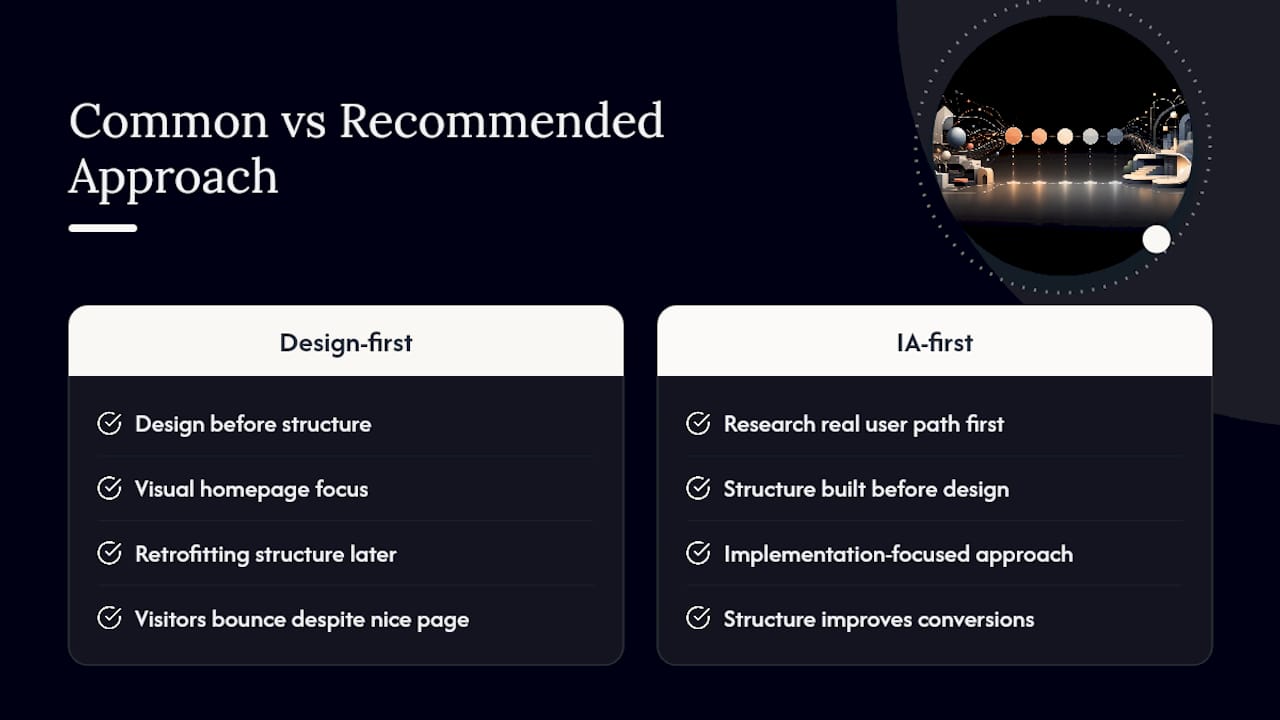
At Moderatemurmurations, structuring content clearly is part of every fast, AI-assisted build we do for small businesses and service providers, informed by what actually gets tracked and tested on client projects. Christopher, who leads this work, applies an implementation-focused approach: research the real user path first, then build the site around it instead of retrofitting structure onto a finished design.
What gets underestimated most is how often a site’s biggest conversion problem has nothing to do with copy or design. It’s that the pricing page sits four clicks deep behind a mega menu nobody reads. Fix the structure and the words underneath it start working harder automatically.
— Christopher
Ready to Fix Your Site’s Structure?
If you’ve read this far and started mentally counting how many clicks it takes to reach your own pricing page, that’s usually the sign structural work is overdue. Moderatemurmurations builds sites with the information architecture handled upfront, not bolted on after launch, which is the difference between a site that gets faster to build correctly the first time versus one that needs a second round of fixes six months in.

Depending on where your project stands, a few paths make sense. A Foundational Review (from $250, one-off) audits your current structure and flags what’s costing you findability. A Launch Sprint (from $1,500, one-off) fits a leaner site that needs clean IA baked in fast. A full Business Launch Architecture (from $2,500, one-off) covers structure, design, and copy together for a new build. Start with a free consultation on the build page to figure out which one matches your situation, and walk away with a clear next step instead of another list of things to fix someday.
Sources
- Website information architecture: How to optimize for UX | CXL
- Information Architecture vs. Sitemaps | Nielsen Norman Group
- Site architecture for SEO: Structure that ranks & scales | Search Engine Land
- What is content architecture and why does it matter? | Contentful
FAQ
What are the 7 C’s of a website?
Definitions vary across practitioners, and there’s no single agreed-upon framework tied to that exact number in the sources covering information architecture. Focus instead on the four core IA components: organization, labeling, navigation, and search.
How do I develop an information architecture for my website?
Follow five stages: research your users and analytics, categorize content through an inventory, label sections in plain language, map the structure into a sitemap and user flows, then test with card sorting and tree testing before development.
What are the 8 principles of information architecture?
They cover ideas like consistent labeling across the site, the disclosure principle (revealing just enough information to guide a decision), and the front door principle, which assumes visitors can land on any page first, not just the homepage.
Is information architecture the same as a sitemap?
No. Information architecture is the strategic logic organizing your content and its relationships, while a sitemap is a visual or XML artifact that documents part of that structure. A sitemap built without real IA work behind it won’t scale as your site grows.
What does Moderatemurmurations charge for IA work?
A Foundational Review starts from $250 one-off, and a Launch Sprint starts from $1,500 one-off. Full project pricing is available on the build page after a free consultation.