The Role of Automation in Scaling Businesses
The Role of Automation in Scaling Businesses

Business automation is defined as the use of technology to execute repetitive workflows without manual intervention, and its role in scaling businesses is to grow output without growing headcount at the same rate. For small and mid-sized businesses, this distinction is everything. You can only hire so fast, and burnout hits long before your revenue catches up. Tools like Salesforce CRM, Xero, and Zapier now put enterprise-grade automation within reach of businesses with five employees or fifty. The result is faster cycle times, fewer errors, and the kind of operational consistency that makes growth sustainable rather than chaotic.
How does automation drive operational efficiency and reduce costs?
Automation’s core function is removing manual effort from high-volume, rule-based tasks. When a workflow runs on defined logic rather than human memory, it executes the same way every time. That consistency is what reduces errors and speeds up routing across approvals, invoices, and customer communications.
The cost impact is measurable. Companies that automate intelligently save an average of 32% on operating costs. That figure reflects what happens when you stop paying people to copy data between systems, chase approvals, or manually reconcile records.
Here is where automation delivers the most direct efficiency gains for small and mid-sized businesses:
- Invoice and payment processing: Xero automates invoice creation, payment reminders, and reconciliation, cutting finance admin from hours to minutes.
- Lead routing and CRM updates: Salesforce automatically assigns leads, logs activity, and triggers follow-up sequences without a sales rep touching a record.
- Scheduling and confirmations: Automated booking tools send confirmations, reminders, and follow-ups without staff involvement.
- Reporting and dashboards: Automated data pulls replace manual spreadsheet updates, giving owners real-time visibility.
Automation completes tasks in minutes rather than hours. That time reclaimed is not just a productivity gain. It is capacity your team can redirect toward work that actually requires human judgment.
What are the best strategies for implementing automation when scaling?

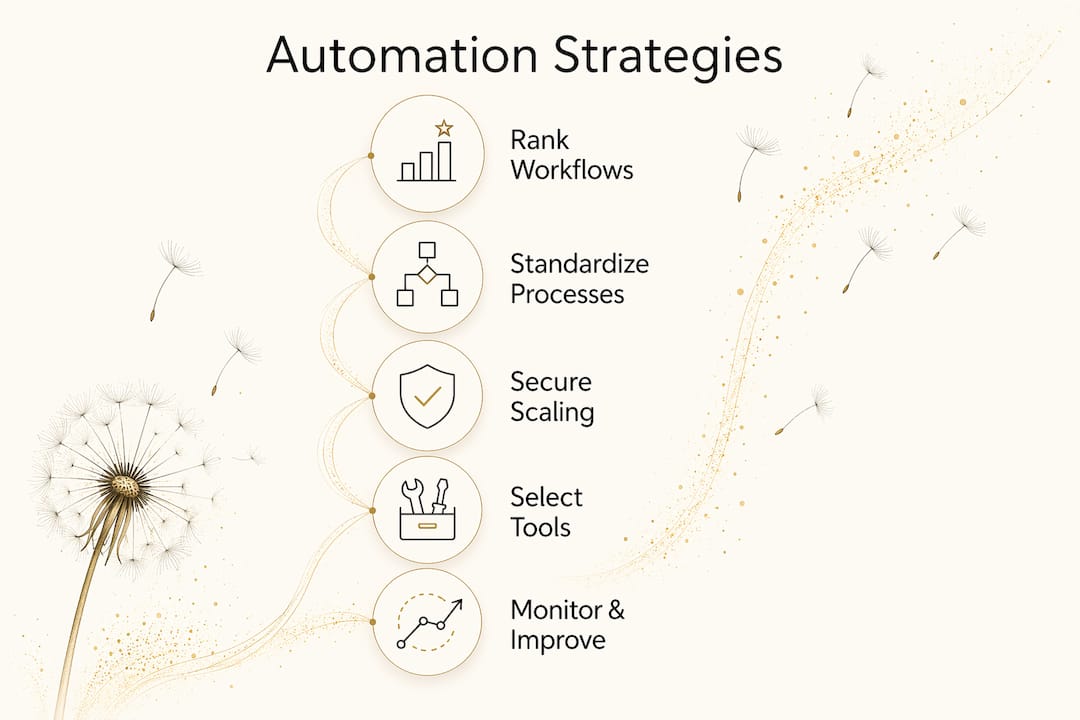
The most common automation failure is not a technology problem. It is a process problem. Standardizing before you automate is the single most important principle for any business scaling its operations. When you automate a messy process, you get a faster, more consistent version of the mess.
Follow these steps before you build any automation:
- Document the current process in full. Write down every step, every decision point, and every exception. If you cannot explain it clearly, you cannot automate it reliably.
- Remove variation. Identify steps that different team members handle differently. Standardize those steps first.
- Define the trigger and the outcome. Every automation needs a clear starting condition and a defined end state. Vague triggers produce unreliable results.
- Start with one workflow. Pick the highest-volume, most repetitive process and automate that first. Prove the model before expanding.
- Build your system of record. Integrated automation prevents data silos and keeps a single source of truth across your tools.
Pro Tip: Rank your workflows by three criteria before automating: volume, repeatability, and handoff frequency. High-volume, rule-based workflows with frequent approvals or handoffs deliver the fastest return on automation investment.
Security is a real concern as automation scales. More automated connections mean more potential vulnerabilities. Automated security verification of system configurations, as recommended by NIST, reduces exposure without adding manual overhead. Build this into your automation plan from the start, not as an afterthought.
How does automation improve customer and employee experience?
Automation’s impact on growth extends well beyond internal workflows. It directly shapes how customers experience your business and how your team feels about their work.
On the customer side, automating Tier-1 support inquiries through self-service frees your team to handle complex cases that actually require human attention. A customer who gets an instant answer to a basic question at 11 p.m. is a customer who does not call you at 9 a.m. That shift in capacity is significant for small teams.
On the employee side, the data is clear:
- Burnout reduction: 29% of small business owners automate as much as possible specifically to avoid burnout. Repetitive manual work is the leading cause of disengagement in small teams.
- Focus on high-value work: When staff stop entering data and start solving problems, job satisfaction rises.
- Faster onboarding: Automated onboarding workflows deliver consistent training materials, task assignments, and system access without a manager coordinating every step.
- Error detection: Automated timesheet and payroll checks catch discrepancies before they become costly corrections.
“Administrative digitalization improves productivity not just internally but also in firms’ external interactions, widening scaling benefits beyond direct process automation.” — IMF Research
That external dimension matters. When your back-office runs cleanly, your customer-facing operations run faster. The two are connected more directly than most business owners realize.
What automation tools best support scaling small and mid-sized businesses?
The right tool depends on what you are automating, but a few platforms stand out for small and mid-sized businesses because they balance capability with ease of use.
| Tool | Primary Use | Best For | Integration Depth |
|---|---|---|---|
| Salesforce | CRM, sales, and marketing automation | Businesses with active sales pipelines | High: connects to hundreds of apps |
| Xero | Finance, invoicing, and payroll | Service businesses and product sellers | High: banks, payroll, and inventory |
| Zapier | Cross-app workflow automation | Teams using multiple disconnected tools | Very high: 6,000+ app connections |
| SAP | Process automation at scale | Mid-sized businesses with complex ops | High: ERP and workflow integration |
Salesforce works best when your growth bottleneck is sales and customer management. Xero solves the finance and compliance side. Zapier sits in the middle and connects tools that do not natively talk to each other. SAP fits businesses that have outgrown lighter tools and need deeper process control.
The key selection principle is integration depth. A tool that cannot connect to your existing systems creates a new silo rather than eliminating one. Before you commit to any platform, map your current tech stack and confirm the integrations you need actually exist. A marketing automation guide for small businesses can help you identify where automation fits into your growth plan specifically.
Key Takeaways
Automation scales businesses by removing manual effort from repeatable workflows, cutting costs, and freeing your team to focus on work that drives real growth.
| Point | Details |
|---|---|
| Standardize before automating | Document and clean up each process before building automation to avoid amplifying existing problems. |
| Cost savings are measurable | Intelligent automation saves an average of 32% on operating costs, according to Deloitte research cited by Xero. |
| Prioritize by volume and handoffs | Rank workflows by volume, repeatability, and handoff frequency to identify the highest-return automation candidates. |
| Integration prevents silos | Build automation as a connected system of record, not a collection of disconnected tools. |
| Employee and customer gains are linked | Automating Tier-1 support and repetitive admin reduces burnout and improves customer response times simultaneously. |
What I have learned about automation and sustainable growth
The businesses I see struggle with automation share one trait: they treat it as a shortcut rather than a discipline. They automate before they document. They connect tools before they define outcomes. Then they spend more time debugging their automations than they ever spent doing the task manually.
The businesses that scale well do the opposite. They pick one painful, high-volume process. They clean it up. They automate it. They measure the result. Then they move to the next one. That iterative approach sounds slow, but it compounds fast. By the time a business has automated five or six core workflows, the operational difference is dramatic.
One thing most articles skip: automation does not replace the need for clear thinking. It amplifies whatever thinking you have already done. A well-designed workflow running on Zapier or Salesforce will execute flawlessly at 10,000 repetitions. A poorly designed one will fail at 10,000 repetitions too, just faster and more expensively. The discipline is in the design, not the technology.
I also think the burnout angle is underrated. The US Chamber of Commerce data showing 29% of small business owners automate to avoid burnout is not a soft metric. Burnout is an operational risk. When the owner or a key team member hits a wall, the business stalls. Automation is one of the few tools that directly reduces that risk while also cutting costs. That combination is rare.
For owners building content-driven growth strategies, automation is what makes those strategies sustainable at scale. Publishing consistently, following up with leads, and managing customer communications manually is a ceiling. Automation removes it.
— Christopher
How Moderatemurmurations helps you build automation that works
Moderatemurmurations builds the digital infrastructure that makes automation practical for small and mid-sized businesses. That means AI-assisted workflows, clean system architecture, and connected tools that actually talk to each other.

If you are ready to move past manual processes and build a business that runs with less friction, Moderatemurmurations can help you get there faster. From launching your business online with the right foundations to designing custom AI workflows and digital systems built for your growth stage, the work is practical, fast, and built to last. Book a free consultation and get a clear picture of where automation fits in your business right now.
FAQ
What is the role of automation in scaling a business?
Automation scales businesses by executing repeatable, high-volume workflows without proportional headcount increases. It reduces costs, minimizes errors, and improves cycle times so growth does not require hiring at the same rate as output.
How much can automation reduce operating costs?
Companies that automate intelligently save an average of 32% on operating costs, based on Deloitte research. The savings come from eliminating manual data entry, reducing errors, and cutting time spent on administrative tasks.
What should I automate first in my small business?
Start with your highest-volume, most repetitive workflow that involves frequent handoffs or approvals. SAP’s process automation framework recommends ranking workflows by volume, rule-repeatability, and handoff frequency to identify the best starting point.
What is the biggest mistake businesses make when automating?
Automating a process before it is standardized is the most common failure. When a process has inconsistent steps or undocumented exceptions, automation amplifies those problems rather than solving them.
Does automation help with employee burnout?
Yes. A survey cited by the US Chamber of Commerce found that 29% of small business owners automate specifically to avoid burnout. Removing repetitive manual tasks lets employees focus on higher-value work, which directly improves job satisfaction and retention.