When Proposal Automation Actually Pays Off
When Proposal Automation Actually Pays Off

Proposal automation is worth adopting once your team handles recurring or complex proposals, since manual drafting stops scaling past a certain volume. The real payoff hinges on matching the tool category to your actual bottleneck, whether that’s content reuse, workflow coordination, or draft speed. Before you demo anything, prioritize content governance, accurate template output, CRM integrations, and security controls. Those four factors determine whether the tool earns its keep or just adds another system to babysit.
TL;DR:
- Proposal automation is most beneficial for teams managing more than ten proposals quarterly or handling complex, compliance-heavy RFPs, not for smaller, repetitive tasks.
- Key features to prioritize in demos include content traceability, RFP parsing accuracy, template matching, role-based workflow approval, and integration security.
- Setup times range from weeks for workflow tools to several months for content libraries, depending on the tool category and the scope of deployment.
- Red flags to avoid include vague data handling policies, unclear content traceability, high-cost pricing models, and inability to test with your real documents.
- Starting with a pilot project and initial content preparation significantly improves the chances of successful adoption and measurable efficiency gains.
Table of Contents
- What Proposal Automation Is and Why It Pays Off
- How Does Proposal Automation Work?
- Which Features Actually Matter in a Demo?
- Who Sees the Best Return, and How Fast?
- How Do the Leading Proposal Automation Tools Compare?
- How Do You Choose the Right Tool and Avoid Red Flags?
- What Does a Realistic Rollout Timeline Look Like?
- Practical Practitioner Notes From Moderate Murmurations
- Where Is Proposal Automation Actually Headed?
- A Faster Path Than Evaluating Fifteen Vendors
- Sources
What Proposal Automation Is and Why It Pays Off
Proposal automation covers a wide spectrum, not one single type of software. On one end sit simple content libraries that store approved boilerplate. On the other end sit end-to-end AI platforms that parse RFPs, generate tailored content, and produce formatted proposals inside your corporate templates. Workflow tools sit in between, coordinating review and approval without necessarily writing anything for you.
We think of it as four layers stacked on top of each other: content libraries, workflow coordination, AI-assisted drafting, and full lifecycle management. Most organizations don’t need the top layer on day one. They need whichever layer solves the problem that’s actually costing them time.
Pro Tip: Map your last five proposals against these four layers before you shop. You’ll usually find the bottleneck sits in one layer, not all of them.
The concrete benefits show up fast once the right layer is in place:
- Reviewers stop rewriting the same boilerplate section every quarter
- Proposals go out with consistent formatting and messaging across every writer on the team
- Turnaround time on standard RFPs drops because drafting starts from a template, not a blank page
- Managers gain visibility into where a proposal sits in review instead of chasing status over email
Teams responding to more than ten proposals per quarter, or facing complex, compliance-heavy RFPs, see the clearest return. Below that volume, the setup effort can outweigh the time saved, at least in the first year.
How Does Proposal Automation Work?
Every proposal automation platform, regardless of vendor, moves through the same four stages. Understanding them helps you see exactly where a tool plugs into the process you already run.
- Intake and RFP parsing. The system ingests an RFP document, whether uploaded as a PDF or pulled through an integration, and identifies requirements, deadlines, and compliance sections. More advanced platforms flag which requirements map to existing content.
- Content management and reuse. Approved language, case studies, and boilerplate live in a searchable library. The system pulls the right section based on the requirement it’s answering, rather than a writer hunting through old files.
- Draft generation and template merging. The tool merges pulled content into your branded template, producing a first draft. AI-assisted platforms generate new language here, but that text still needs human editing for accuracy and persuasive differentiation.
- Review, approval, and production. Stakeholders route the draft through role-based approval, then the system produces the final formatted document and tracks whether the client opened or engaged with it.
The stages that matter most depend on where your team loses hours. A bid team drowning in reformatting cares most about stage three. A compliance-heavy government contractor cares most about stage one and the traceability that connects generated content back to the original requirement.
Which Features Actually Matter in a Demo?
Vendor demos are designed to impress, not to reveal weak spots. Push past the polished walkthrough and test these five areas directly, because they’re what separate a tool that works from one that creates new problems.
- Content governance and traceability. Ask how the system tracks which library entry produced which paragraph, especially for regulated bids where traceability back to the source requirement is often the deciding factor.
- RFP parsing accuracy. Upload one of your own past RFPs during the demo and watch how well the tool maps requirements to content, not the vendor’s cherry-picked sample document.
- Exact template output. Confirm the generated proposal matches your actual brand template, including conditional content blocks that change based on client type or deal size.
- Workflow automation with role-based approval. Check whether legal, finance, and sales can each get a distinct approval step without someone manually forwarding files.
- Integrations, analytics, and security controls. Confirm CRM sync, e-signature support, and, for regulated industries, whether the platform meets your compliance framework.
Pro Tip: Bring your worst RFP to the demo, not your easiest one. Vendors size their canned examples to make parsing look flawless.
Who Sees the Best Return, and How Fast?
Volume and complexity decide whether proposal automation pays for itself. Teams under roughly ten proposals per quarter with simple, repeatable formats often get by fine with templates and a shared drive. Once you cross that threshold, or once RFPs start carrying dense compliance requirements, manual assembly becomes the actual bottleneck that automation is built to remove.

Return on investment shows up in two places: hours reviewers no longer spend rewriting boilerplate, and proposals that go out days faster because a draft exists before anyone opens a blank document. Faster turnaround also means sales teams can respond to more opportunities in the same window, compounding the effect over a quarter.
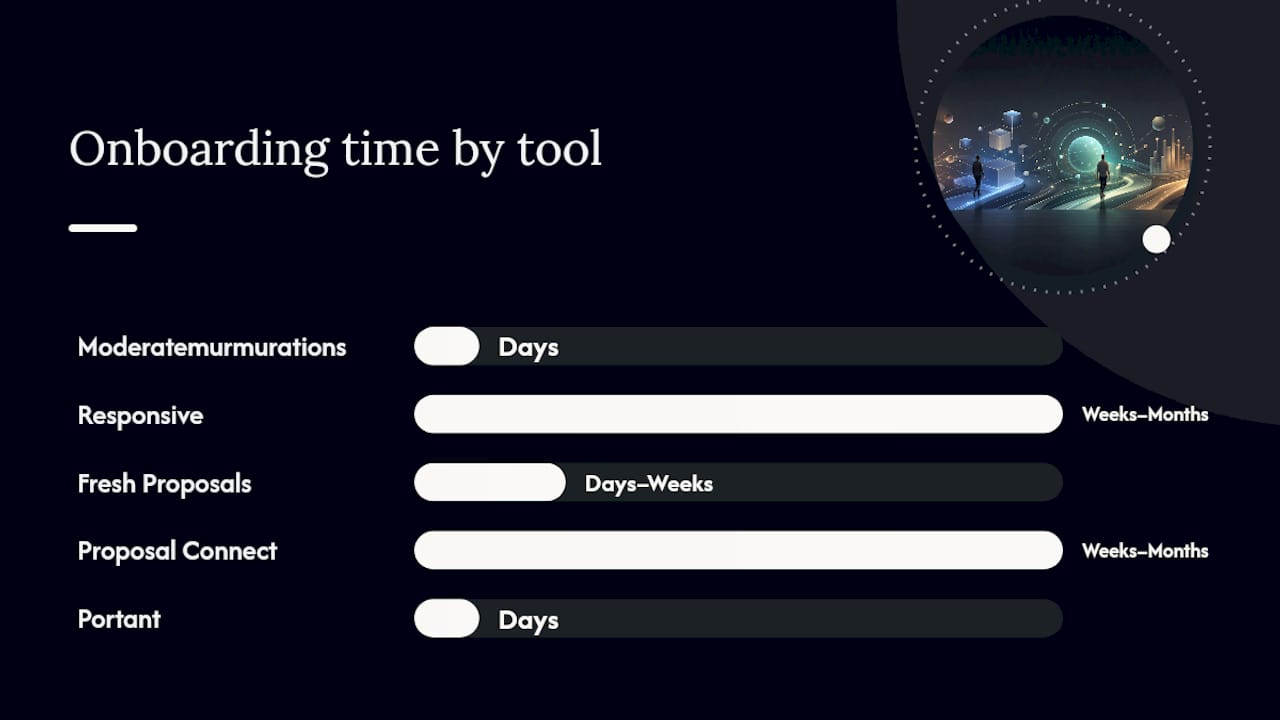
Setup time varies sharply by tool category. Content library platforms typically need two to six months to populate before delivering consistent value, while workflow platforms can go live within weeks. AI-assisted tools land somewhere in between, since the drafting engine works immediately but still needs tuning against your actual language and win themes.
How Do the Leading Proposal Automation Tools Compare?
Fifteen tools dominate this category, and no single one wins every category. The right pick depends on whether your bottleneck is content reuse, client-facing polish, compliance tracking, or raw drafting speed.
| Tool | Best for | AI / RFP parsing | Integrations | Security & compliance | Onboarding time |
|---|---|---|---|---|---|
| Moderatemurmurations | Small businesses and service providers needing a fast, fully built proposal and content system | Custom AI workflow setup, not off-the-shelf parsing | Built around your existing CRM and tools | Handled as part of custom build | Days, not months |
| Responsive | Enterprise teams handling high-volume, compliance-heavy RFPs | Strong requirement-to-content traceability | Enterprise CRM and CPQ | Enterprise compliance frameworks | Weeks to months |
| Fresh Proposals | Teams wanting interactive client-facing proposals and fast sign | Limited parsing, focused on delivery | E-signature, CRM sync | Standard cloud security | Days to weeks |
| Proposal Connect | Government or compliance-heavy contractors | Lifecycle-wide compliance checks | Government procurement systems | Built for compliance-heavy bids | Weeks to months |
| Portant | Teams on HubSpot wanting tight CRM sync | Deal-data driven generation | Native HubSpot integration | Standard cloud security | Days |
| MyProposer | Small to mid teams needing fast first drafts | AI-drafted proposals, interactive quotes | Basic CRM connections | Standard cloud security | Days to weeks |
| Ignition | Service businesses needing proposals plus payments | Minimal parsing, workflow-focused | Payment and onboarding tools | Standard cloud security | Weeks |
| PandaDoc | Teams wanting a broadly adopted document workflow | Template-driven, light AI assist | Wide integration ecosystem | SOC 2 reported by vendor | Weeks |
| Proposify | Agencies focused on design and engagement analytics | Template-driven | CRM and e-signature | Standard cloud security | Weeks |
| Loopio | Teams focused on content reuse at scale | Strong content-library search | CRM and storage | Enterprise-grade options | Months |
| Qwilr | Teams wanting highly designed proposal pages | Limited parsing | CRM and e-signature | Standard cloud security | Days to weeks |
| Templafy | Teams needing template governance at scale | Template compliance focus | Document and CRM systems | Enterprise-grade options | Weeks to months |
| Upland Qvidian | Large enterprise RFP teams | Content automation at scale | Enterprise systems | Enterprise-grade options | Months |
| RFP360 | Teams managing structured RFP intake and response | Structured requirement mapping | CRM and collaboration tools | Enterprise-grade options | Weeks to months |
| Cflow | Teams needing workflow approval automation | Workflow-focused, minimal parsing | Business process tools | Standard cloud security | Weeks |
| Inventive AI | Teams wanting AI-first draft generation | AI drafting emphasis | CRM connections | Standard cloud security | Days to weeks |
A few of these deserve a closer look before you shortlist. Loopio and Upland Qvidian both lean hard into content-library depth, which pays off if your bottleneck is genuinely reuse at scale rather than drafting speed. Qwilr and Fresh Proposals compete on client-facing polish, with live branded links, interactive pricing, and e-signature built to shorten time-to-sign once a proposal reaches the buyer.
Portant stands out for teams already living inside HubSpot, since CRM integrations with live pricing sync eliminate the manual copy-paste errors that creep into deal data otherwise. Proposal Connect and RFP360 both target compliance-heavy bids, where traceability and structured intake matter more than visual design. For a small business or service provider that doesn’t want to manage a new SaaS subscription and its learning curve, a custom-built system through Moderatemurmurations gets the same governance and template consistency without the multi-month vendor rollout.
How Do You Choose the Right Tool and Avoid Red Flags?
Run every serious candidate through the same checklist before you sign anything. Consistency here is what keeps the decision honest instead of swayed by whichever demo had the best lighting.
- Test RFP parsing on your own document, not the vendor’s sample. Accuracy on a curated demo file tells you nothing about how it handles your actual intake.
- Generate output in your real template. Confirm formatting, logos, and conditional content blocks render correctly, not just in the vendor’s generic layout.
- Request the data handling documentation in writing. Ask directly whether the platform meets your industry’s compliance needs, since cloud platforms may fall short of FedRAMP, ITAR, or CMMC requirements that local-first processing handles more cleanly.
- Clarify the pricing model before negotiating. Per-seat, per-proposal, and flat platform fees all behave differently as your team scales, so know which one you’re actually locking in.
- Ask what happens if you leave. Data export terms reveal how much a vendor depends on lock-in rather than genuine value.
Pro Tip: If a vendor won’t let you test parsing on a document you bring, that’s your answer about how well it performs on anything but their curated demo.
Red flags worth walking away from: vague answers about data residency, no clear traceability between generated content and source requirements, and pricing that only appears after a sales call. Match the tool type to your bottleneck. Content reuse problems call for a library-first tool; coordination problems call for workflow automation; speed problems call for AI-assisted drafting.
What Does a Realistic Rollout Timeline Look Like?
A pilot beats a full rollout every time, because it tells you where the tool breaks before you’ve committed your whole bid team to it.
- Design a narrow pilot. Pick one RFP type and measure time-to-first-draft plus reviewer hours saved against your current baseline.
- Audit existing content and map it to templates. This is the unglamorous work that determines whether stage two of the workflow, content reuse, actually functions.
- Test integrations before go-live. Confirm CRM sync, storage connections, and SSO all work under real conditions, not just in a sandbox.
- Train the team on the narrow use case first. Broaden scope only after the pilot metrics hold up.
Track these through the pilot:
- Time-to-first-draft, before and after
- Reviewer hours spent per proposal
- Win rate on the pilot RFP type versus your baseline
- Stakeholder feedback on where the workflow still creates friction
Practical Practitioner Notes From Moderate Murmurations
We’ve watched teams underpopulate their content library, then blame the software when drafts come out thin. Feed the library with your best five proposals before launch, not your first five. That single choice determines whether early drafts feel usable or feel like a rough sketch nobody trusts. Missing traceability is the second common gap: if generated content can’t be traced back to a requirement, reviewers redo the work anyway. We cover the workflow side of this in our guide to AI workflow design, including template mapping and governance rules that keep libraries accurate as they grow.
Where Is Proposal Automation Actually Headed?
The real shift isn’t more automation, it’s less time spent on assembly and more time spent on strategy. AI drafts are a starting point, not a finished proposal. No platform yet replaces the judgment behind a genuine win theme or competitive positioning. Teams that get this right redirect the hours they save toward research and client relationships, not toward chasing a fancier tool.
— Christopher
A Faster Path Than Evaluating Fifteen Vendors
If your team is small enough that a multi-month SaaS rollout feels like overkill, there’s a more direct route. Moderatemurmurations builds the proposal templates, content structure, and AI workflow setup for you, without the vendor evaluation cycle or the per-seat pricing that scales against you as you grow.

We start with a free consultation to understand your current proposal process, where the actual friction sits, and what a working system should look like for your business specifically. From there, we build the templates, connect the integrations you already use, and set up the AI-assisted drafting workflow so your team has something functional in days, not months. This works as an alternative to buying and configuring a SaaS platform yourself, especially if your team doesn’t have a dedicated ops person to manage that rollout. If that sounds like a better fit than another vendor demo, book a free consultation and we’ll map out what your system should look like.