Operational Efficiency for Small Businesses: Quick Wins
Operational Efficiency for Small Businesses: Quick Wins

Operational efficiency means delivering the same or better value to your customers with fewer wasted hours, steps, and dollars. For small businesses, creators, and service providers, that often starts with one place: your digital presence. Map one customer-facing workflow this week, and you will likely find three things you can cut or automate before Friday.
- 77% of CEOs surveyed name operational efficiency as a primary driver of revenue growth. You are not alone in making this a priority.
- The IBM framework for efficiency centers on three levers: people, process, and technology. All three must move together.
- Moderatemurmurations helps small teams turn those levers into a working digital system, fast.
Your one-line action plan: pick one client-facing process (inquiry, onboarding, or booking) and write down every step it currently takes. That list is your audit.
Table of Contents
- What are the fastest operational wins you can act on today?
- Do people, process, and technology all need to change at once?
- How do you run a focused 4–8 week audit without overcomplicating it?
- Which KPIs actually matter for a small team?
- What tools and templates give you the most traction?
- When should you hire help instead of doing it yourself?
- Key Takeaways
- What most small businesses get wrong about efficiency
- Moderatemurmurations builds the digital systems that make efficiency visible
- Useful sources and further reading
What are the fastest operational wins you can act on today?
Speed matters when you are running a small team. These ten wins are organized by the pillar they affect most and how long each takes.
- Consolidate your inbox and notifications (Technology, 30 min): route all client messages to one channel so nothing falls through.
- Create a canned-response library (Process, 1 hour): write five replies you send every week and save them as templates.
- Add a booking link to every touchpoint (Technology, 1 hour): replace back-and-forth scheduling emails with Calendly or a similar tool.
- Audit your homepage headline (Process, 2 hours): if a stranger cannot tell what you do in five seconds, rewrite it.
- Set up one automated follow-up email (Technology, 2 hours): a single post-inquiry email reduces response lag and scales outreach without extra effort.
- Create a client onboarding checklist (Process, 2 hours): document every step so you stop reinventing it each time.
- Remove dead pages from your site (Process, half a day): fewer pages, cleaner navigation, better conversion.
- Set up a simple analytics dashboard (Technology, half a day): Google Analytics 4 or Plausible gives you real data on where visitors drop off.
- Standardize your proposal format (People, half a day): one clean template cuts proposal time by half.
- Batch your content creation (People, 1 day): write four weeks of posts in one session instead of scrambling daily.
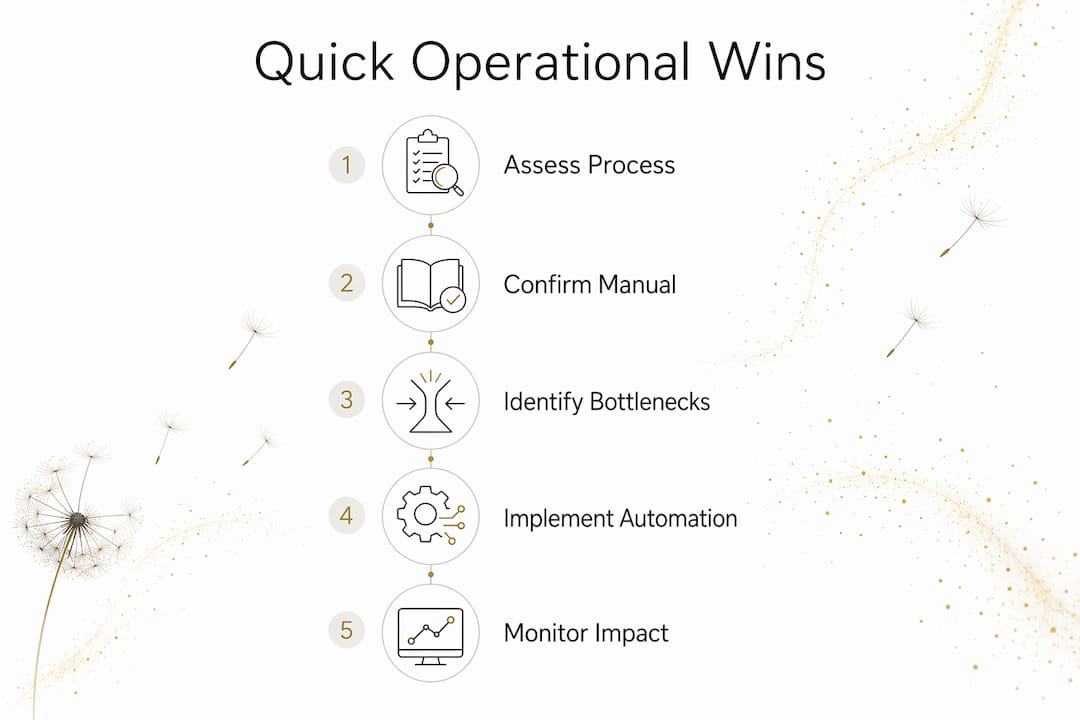
Pro Tip: Before you automate anything, confirm the process actually works well manually. Automating a broken process only makes it break faster.
Do people, process, and technology all need to change at once?
Not always, but ignoring any one of them creates a ceiling. Here is what to check in each area.
People
Ask: does everyone on your team know what “done” looks like for each task? Unclear ownership is the most common source of dropped balls in small teams. Low psychological safety, where people hesitate to flag a broken step, compounds the problem. A short weekly check-in where anyone can name one friction point costs nothing and surfaces issues before they become expensive.

Process
Ask: have you ever written down how a client goes from first contact to paid invoice? Most small businesses have not. Process mapping exposes manual data entry, communication silos, and steps that exist only because “we’ve always done it that way.” A whiteboard sketch or a digital sticky-note board is enough to start.
Technology
Technology is a force-multiplier for good process. Automate a broken process and you get a faster broken process. Fix the process first, then let technology carry the load. — FranklinCovey
Point solutions that do not talk to each other create data silos. Before buying another tool, ask whether it connects to what you already use. A creator who adds a fifth app to manage client communication has not improved efficiency; they have added a coordination problem.
One more distinction worth keeping clear: operational efficiency is about the mechanics of input versus output. Operational excellence is the cultural commitment to continuous improvement over time. You need both, but efficiency comes first.
How do you run a focused 4–8 week audit without overcomplicating it?
A phased approach prevents the most common mistake: buying tools before you understand the problem.
- Weeks 1–2 (Assess): Map three to five customer journeys from first touch to delivery. Interview anyone involved, even if that is just you and one contractor. Pull whatever data you have: response times, conversion rates, error counts.
- Weeks 3–4 (Measure and Prioritize): Score each problem by impact times effort. A high-impact, low-effort fix goes first. Set two to four measurable KPIs with specific targets and a deadline.
- Weeks 5–8 (Implement and Iterate): Make the top two or three changes. Track the KPIs weekly. Adjust based on what the numbers show, not what feels right.
Pro Tip: Keep the audit to three to five journeys. A lightweight audit scoped this way gives you a prioritized roadmap without scope creep or tool overbuying.
| KPI | How to measure | Example target |
|---|---|---|
| Lead response time | Time from inquiry to first reply | Under 2 hours |
| Client onboarding time | Days from signed contract to kickoff | 3 days or fewer |
| Website conversion rate | Form completions ÷ unique visitors | 2–5% for service pages |
| Proposal acceptance rate | Accepted proposals ÷ sent | — |
| Error or rework rate | Tasks requiring correction ÷ total tasks | Under 5% |
Budget guidance: a DIY audit costs only your time. Lightweight paid tools for project management, automation, or analytics can be affordable monthly subscriptions for small teams. Hiring a specialist for a full audit and implementation involves a larger investment depending on scope.
Which KPIs actually matter for a small team?
Track fewer metrics, but track them consistently. These six cover the ground most small businesses and creators need.
- Cycle time: total time from starting a task to completing it. Target: cut it by 20% within 90 days.
- Lead response time: minutes or hours from inquiry to your first reply. Under two hours is a strong benchmark for service businesses.
- Website conversion rate: visitors who take your desired action. A well-structured service page should convert at 2–5%.
- Revenue per team member: total revenue divided by headcount (including contractors). Rising over time signals that your efficiency in operations is improving.
- Error or rework rate: tasks that had to be redone. Anything above 5% points to a process or communication gap.
- First-pass yield: the percentage of deliverables accepted by the client without revision. Higher is better; track it monthly.
The operational efficiency ratio (operating expenses plus cost of goods sold, divided by net revenue) gives you a single number for financial health. A ratio below 1.0 means you are profitable. Most small service businesses should track this quarterly, not daily.
A note on targets: true efficiency is not always lower spending. Sometimes investing more in a premium tool or a professional design produces disproportionately higher output or conversion. Measure cost per meaningful output, not just cost.
What tools and templates give you the most traction?
Choose tools by fit, not by feature count. Here is a practical breakdown by category.
- Process mapping: Miro, Lucidchart, or a free FigJam board. Use these in weeks 1–2 of your audit.
- Lightweight CRM and contact funnels: HubSpot’s free tier or Notion databases work for teams under ten.
- Form and automation: Typeform plus Zapier, or a native form builder inside your website platform.
- Analytics dashboard: Google Analytics 4 for traffic; a simple Notion or Google Sheets KPI tracker for internal metrics.
- Landing page and template CMS: a clean, fast website template cuts build time and keeps your online visibility consistent.
- Payment and fulfillment microtools: Stripe for payments, TidyCal or Calendly for scheduling.
| Tool category | DIY template enough? | When to buy a paid tool |
|---|---|---|
| Process mapping | Yes, for 1–5 workflows | When you have several processes to document |
| Analytics | Yes, GA4 is free | When you need custom reporting or attribution |
| Automation | Yes, for 1–2 zaps | When you have 5+ recurring workflows |
| CRM | Yes, for under 50 contacts | When leads exceed what a spreadsheet handles |
A ready-made AI workflow design template can cut your setup time significantly. Start with a process map template, a two-column KPI dashboard in Google Sheets, and a simple automation checklist before spending anything.
When should you hire help instead of doing it yourself?
DIY works when the scope is clear, the skills exist on your team, and the timeline is flexible. Hire when any of those three conditions breaks down.
Decide to hire when:
- You have mapped the problem but lack the technical skill to fix it.
- The cost of delay (lost leads, client churn) exceeds the cost of a contractor.
- You need the fix in under four weeks and your calendar is already full.
Questions to ask any vendor:
- What does your discovery process look like, and what do you deliver at the end of it?
- Which KPIs will you track, and how will you report on them?
- What does handover look like, and will we own the assets afterward?
- How do you handle scope changes?
Red flags to watch for:
- They recommend a specific tool before completing any audit.
- They cannot name a measurable outcome they will be accountable for.
- The contract locks you into ongoing fees with no clear exit.
- They skip stakeholder interviews and go straight to implementation.
Typical timelines: a site funnel plus basic automation runs four to six weeks. A full audit plus prioritized implementation runs six to ten weeks. Automated back-office functions like payroll can often be set up in days once the right tool is chosen.
Key Takeaways
Operational efficiency for small businesses comes down to one discipline: measure what matters, fix the highest-impact problem first, and confirm the process works before you automate it.
| Point | Details |
|---|---|
| Audit before you buy | Map three to five workflows before purchasing any new tool to avoid automating broken processes. |
| Track six core KPIs | Cycle time, response time, conversion rate, revenue per team member, error rate, and first-pass yield cover most small-team needs. |
| Phase your improvements | A 4–8 week audit (assess, measure, prioritize, implement) prevents scope creep and wasted spend. |
| Efficiency is not just cost-cutting | Measure cost per meaningful output; sometimes investing more produces disproportionately higher results. |
| Moderatemurmurations | Provides fast, AI-assisted websites, funnels, and digital systems built to reduce friction and improve online conversion for small teams. |
What most small businesses get wrong about efficiency
The conventional advice is to cut costs and automate more. That framing misses the real problem. Most inefficiency in small businesses and creator operations is not a technology gap. It is a clarity gap. Unclear messaging on a website, an undefined onboarding process, a proposal that takes three rounds of revision because the scope was never pinned down. These are process and people problems, and no tool fixes them.
What I have seen work, consistently, is starting with the customer journey and working backward. Where does the client first encounter confusion? Where do you, as the operator, spend time on something a template or a clear process could handle? Those two questions surface more useful improvements than any software audit.
The other thing worth saying plainly: efficiency gains compound. A two-hour reduction in your onboarding cycle, repeated across forty clients a year, is eighty hours back. That is two full work weeks. Spend those weeks on the work only you can do.
Moderatemurmurations builds the digital systems that make efficiency visible
If you have done the audit and know what needs to change, but the build feels like the bottleneck, that is exactly where Moderatemurmurations works. We create fast, clean, AI-assisted websites, landing pages, brand copy, and digital systems for small businesses, creators, and service providers. The focus is always on reducing friction: clearer messaging, faster load times, forms that actually convert, and automations that hand off work without dropping it.

A typical engagement runs four to eight weeks. You come in with a goal (more leads, faster onboarding, a cleaner brand presence), and we deliver a working system with the assets you own outright. No long-term contracts, no mystery pricing. Ready to reduce the friction in your digital presence? Start here and tell us what you are building.
Useful sources and further reading
- IBM: What Is Operational Efficiency? — source for the 77% CEO statistic and the operational efficiency ratio formula
- NetSuite: Operational Efficiency Guide — definition, goals, and input/output framing
- FranklinCovey: People, Process, Technology Alignment — pillars framework and the technology-as-force-multiplier principle
- 6Sigma: Operational Improvement Best Practices — phased audit methodology and goal-setting guidance
- NICE Actimize: Measuring and Improving Operational Efficiency — OE review benefits and the cost-per-output framing
- Hyland: Improve Operational Efficiency — process mapping for small teams
- Stripe: What Is Operational Efficiency? — efficiency vs. excellence distinction
- Coursera: How to Improve Operational Efficiency — process mapping as an assess-phase activity
- Moderatemurmurations: Business Systems — frameworks for organizing operations
- Moderatemurmurations: AI Adoption for Small Business Owners — responsible AI adoption aligned with process and people