Launch an Internal Knowledge Base in Four Weeks With 20 Starter FAQs
Launch an Internal Knowledge Base in Four Weeks With 20 Starter FAQs

An internal knowledge base is a permissioned, searchable repository where employees find company answers, SOPs, and policies without pinging a coworker. It exists to cut the time people burn hunting for information, since a significant portion of digital workers report struggling to find what they need to do their jobs. The fastest way to start: audit your team’s 20 most-repeated questions before you pick a single tool.
TL;DR:
- A knowledge base should prioritize answering the top 20 repeated questions, created in simple formats like how-tos, checklists, or decision trees.
- Search functionality is critical, with federated search preferred if content is scattered across multiple platforms, and integration with tools like Slack or Teams boosts adoption.
- Assigning clear ownership and regular review schedules for each article significantly improves long-term accuracy and relevance, preventing knowledge drift.
- Limiting content to curated, authoritative answers avoids clutter; avoid dumping Slack threads or meeting notes that do not serve as definitive resources.
- Launching a functional knowledge base in four weeks is feasible with focused scope, dedicated owners, and integrating search directly into existing collaboration tools.
Table of Contents
- What Goes Into an Internal Knowledge Base?
- What Features Does a Knowledge Base Tool Actually Need?
- Why Do Companies Actually Need an Internal Knowledge Base?
- How Do You Launch a Knowledge Base in Four Weeks?
- How Should You Structure and Tag Content So People Can Find It?
- How Do You Stop Knowledge Drift Before It Starts?
- How Do You Make Your Knowledge Base Safe for AI Assistants?
- How Do You Know If People Are Actually Using It?
- How Do You Get Employees to Actually Adopt a New Knowledge Base?
- Author perspective: common pitfalls and practical shortcuts
- How Moderate Murmurations Can Help You Launch a Working Knowledge Base
- Sources
- FAQ
What Goes Into an Internal Knowledge Base?
An internal knowledge base is different from your public help center or marketing docs in one key way: it assumes internal context and stays behind permissions. It can live in the same software as your customer-facing documentation, but the content itself needs its own curation and its own access rules, since it’s built for people who already know your product, your org chart, and your internal shorthand, not for outside customers meeting your brand for the first time, according to HelpDocs’s breakdown of internal versus external documentation.
That distinction matters for what you write, not just where you host it. The core content types worth including are:
- Standard operating procedures (SOPs): step-by-step instructions for repeatable tasks.
- Runbooks: what to do when something breaks, written for the person on call at 2 a.m.
- Onboarding guides: everything a new hire needs in week one, without a manager repeating themselves.
- Policies: PTO, expense rules, security requirements, anything with a compliance angle.
- Troubleshooting guides: common problems mapped to fixes, ideally with a decision tree.
- Decision memory: why a past choice was made, so nobody re-litigates it six months later.
Resist the urge to dump every Slack thread and meeting note into the system. A knowledge base only works when it’s the curated, authoritative subset of what your company knows, not a mirror of every document that’s ever been drafted. The Docsio guide to internal knowledge bases makes this point bluntly: draft material and stream-of-consciousness notes belong in a separate workspace, not in the system people trust for answers.
Start with the top 10 to 20 questions your team already answers on repeat. Ask your help desk, your onboarding buddies, and your Slack search history what people ask most. Then write those first, in one of three formats: a short how-to for a task, a decision tree for a branching problem, or a checklist for a process with a fixed sequence. Skip the long-form essay format entirely at launch. Nobody reads 1,200 words to find out how to reset a VPN token.
What Features Does a Knowledge Base Tool Actually Need?
Search quality decides whether your knowledge base gets used or ignored. You have two real options: native search built into the platform, or federated search that pulls results from multiple tools (your KB, your file storage, your ticketing system) into one query box. Federated search wins when your company already has knowledge scattered across four different apps and nobody wants to open a fifth just to look something up.
Beyond search, a handful of capabilities separate a tool that gets adopted from one that gets abandoned after the launch demo:
- Slack or Teams integration, so people can search or ask without leaving the tool they’re already in.
- Single sign-on (SSO) and group-based permissions, so sensitive HR or finance content stays restricted without manual access requests.
- Audit trails and version history, so you can see who changed what, and roll back a bad edit.
- Named ownership and expiry dates on every article, tied to approval workflows before anything goes live.
- Answer-level search and gap analytics, the kind KPSOL’s knowledge management tooling highlights as standard for enterprise deployments, so you can see what people searched for and got nothing.
- Export and portability, so your content isn’t hostage to one vendor if you switch tools later.
On the compliance side, check that the platform supports role-based access at the folder or category level (not just document by document), logs access for sensitive categories, and lets you set retention or archival rules for anything tied to legal or HR requirements. If you’re evaluating vendors, reviews on sites like G2’s page for Helpjuice are a useful gut check on where search and editing experiences tend to fall short in practice, even though no single review should be your only input.
One tradeoff worth naming early: the more granular your permission structure, the more governance overhead you take on. A flat, mostly-open KB is easier to maintain but riskier for sensitive content. A tightly permissioned one protects data but needs someone actively managing group membership. Pick based on what you’re storing, not what looks impressive in a sales demo.
Why Do Companies Actually Need an Internal Knowledge Base?
The immediate payoff is fewer interruptions. Every question answered by search instead of a direct message is time an expert gets back, and time a new hire doesn’t spend waiting on a reply. Given that nearly half of digital workers report struggling to locate the information they need, a working KB addresses one of the most common productivity drains in any office, remote or not.
The outcomes worth tracking break into three buckets: fewer interruptions to subject-matter experts, faster onboarding, and ticket deflection for internal help desks. Here’s how to frame targets across the first year:
| Timeframe | What to measure | Reasonable early target |
|---|---|---|
| Month 1 | Search usage, zero-result rate | KB gets used weekly by most of the team |
| Quarter 1 | Deflected internal tickets, new-hire time-to-productivity | Fewer repeat questions to the same 3 to 4 experts |
| Year 1 | Onboarding time reduction, dwell time on top articles | Measurable drop in ramp time for new hires |
When you present this to leadership, skip the abstract pitch about “centralizing knowledge.” Show the actual number of interruptions a specific manager or engineer fielded last month, then show the projected drop once the top 20 questions are documented and searchable. Stakeholders respond to a concrete before-and-after, not a philosophy of knowledge management.
How Do You Launch a Knowledge Base in Four Weeks?
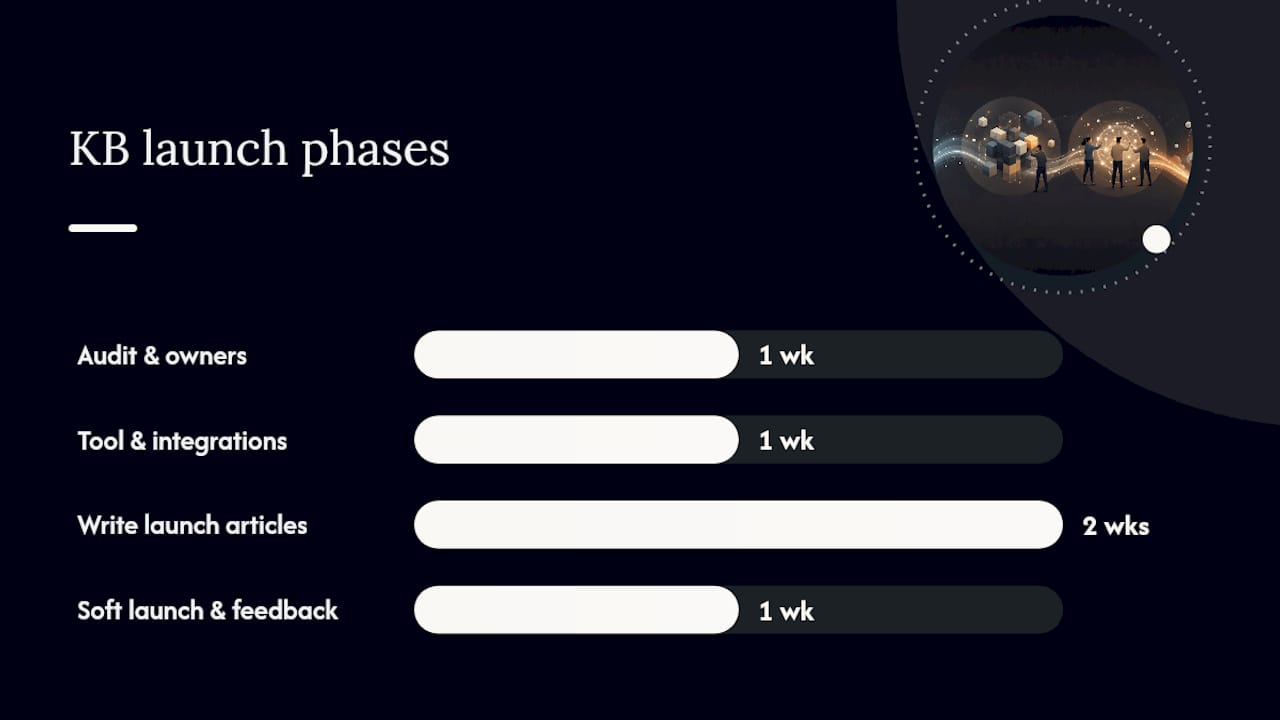
A knowledge base doesn’t need a quarter-long rollout to be useful. A scoped, four-week plan gets a small, high-value version live and tested with real users before scope creep kills the project.
- Week 1: Audit and scope. Pull your team’s top 20 repeated questions from help desk tickets, Slack search, and onboarding feedback. Resist adding anything outside that list yet.
- Week 1: Assign owners. Every content category (HR, IT, sales operations, engineering) needs one named owner, not a team distribution list. Ownership is the single biggest predictor of whether a KB survives past its first year, according to Docsio’s practical launch guide.
- Week 2: Pick the tool and wire integrations. Choose based on search quality, SSO support, and whether it connects to Slack or Teams. Don’t evaluate features you won’t use in the first quarter.
- Week 2 to 3: Write the launch articles. Draft the top 20 answers using the how-to, decision-tree, and checklist formats. Every article needs an owner name, a one-line TL;DR at the top, and a last-reviewed date visible on the page.
- Week 4: Soft launch and collect feedback. Release to one team first, watch what they search for that returns nothing, and fix the gaps before a company-wide announcement.
Involve a small group in this process: one owner per category, someone from IT for SSO and integrations, and a couple of frontline employees who can tell you honestly whether an article actually answers their question. Keep the launch checklist per article short: named owner, one-line summary, last-reviewed date, and a link back to the source system if the content originated elsewhere.
The biggest risk at this stage is scope creep. Teams get excited and start migrating every old wiki page on day one. Don’t. Migrate later, once the core 20 articles prove the format works and people are actually using search instead of DMs.
How Should You Structure and Tag Content So People Can Find It?
Taxonomy decides whether your knowledge base feels instant or frustrating. The pattern that works best in practice organizes top-level categories around people and moments, not departments: “New Hire,” “Running Payroll,” “Client Onboarding,” instead of “HR,” “Finance,” “Sales.” People searching don’t think in org-chart terms. They think in terms of the task in front of them.
Write the answer first. The title and the opening line of every article should state the conclusion, not build up to it. “How do I request time off?” followed immediately by the two-step answer beats a title like “PTO Policy Overview” followed by three paragraphs of context before the actual steps show up. If someone has to scroll to find the answer, the article has already failed its job.
Tagging matters more than most teams expect, but only if it’s disciplined. Pick a small, consistent tag set (by team, by task type, by system) and avoid letting every author invent new tags on the fly. Canonicalize duplicate topics into one article rather than letting three near-identical guides compete in search results; splitting an answer across multiple pages is one of the fastest ways to erode trust in results.
Finally, connect search to where people already work. If your team lives in Slack, a KB that only lives in a separate browser tab will get used less than one wired into a /ask command or federated search bar inside chat. The goal is zero extra clicks between the question forming in someone’s head and the answer appearing on screen.
How Do You Stop Knowledge Drift Before It Starts?
Knowledge drift is what happens when nobody’s job includes keeping the content accurate, and stale answers quietly start outnumbering current ones. It’s the single most common reason a well-launched KB degrades into something nobody trusts within a year.
The fix is governance discipline, not more content:
- Assign a named directly responsible individual (DRI) per category, with a visible quarterly review date on every article.
- Require approval workflows before any new article or major edit goes live, especially for policy and compliance content.
- Set expiry dates on time-sensitive material (benefits enrollment windows, seasonal processes) so outdated pages get flagged automatically instead of lingering.
- Build an escalation path for disputed or unclear content, so conflicting answers get resolved by the owner, not by whoever edited last.
- Run a monthly monitoring routine: pull zero-result search reports, check your most popular queries against your most popular articles, and flag pages that haven’t been touched in over a quarter.
Named ownership plus a fixed review cadence predicts long-term survival better than which software you picked, a point Elium’s research on knowledge infrastructure backs directly. The tool matters less than whether someone’s calendar has a recurring reminder to check the content.
Zero-result reports deserve special attention. Every search that returns nothing is a gap in your documentation and a signal about what your team actually needs next. Review that list monthly, not annually. It’s the cheapest content roadmap you’ll ever have.
How Do You Make Your Knowledge Base Safe for AI Assistants?
Feeding your entire knowledge base into an AI assistant without governance is how you end up with a chatbot confidently citing a policy that changed eight months ago. The fix is what’s often called a governed knowledge layer: a curated set of owner-reviewed, expiry-dated content sitting between your raw documents and any AI agent that queries them, rather than letting an assistant index everything indiscriminately.
The distinction matters because a raw index treats every document equally, drafts, outdated policies, and current SOPs alike. A governed layer adds ownership, validity dates, and approval status as metadata, so retrieval systems can filter out anything unreviewed or expired before it ever reaches a language model. Elium’s approach to knowledge infrastructure for retrieval-augmented generation (RAG) frames this as the difference between an assistant that hallucinates and one that returns cited, current answers.
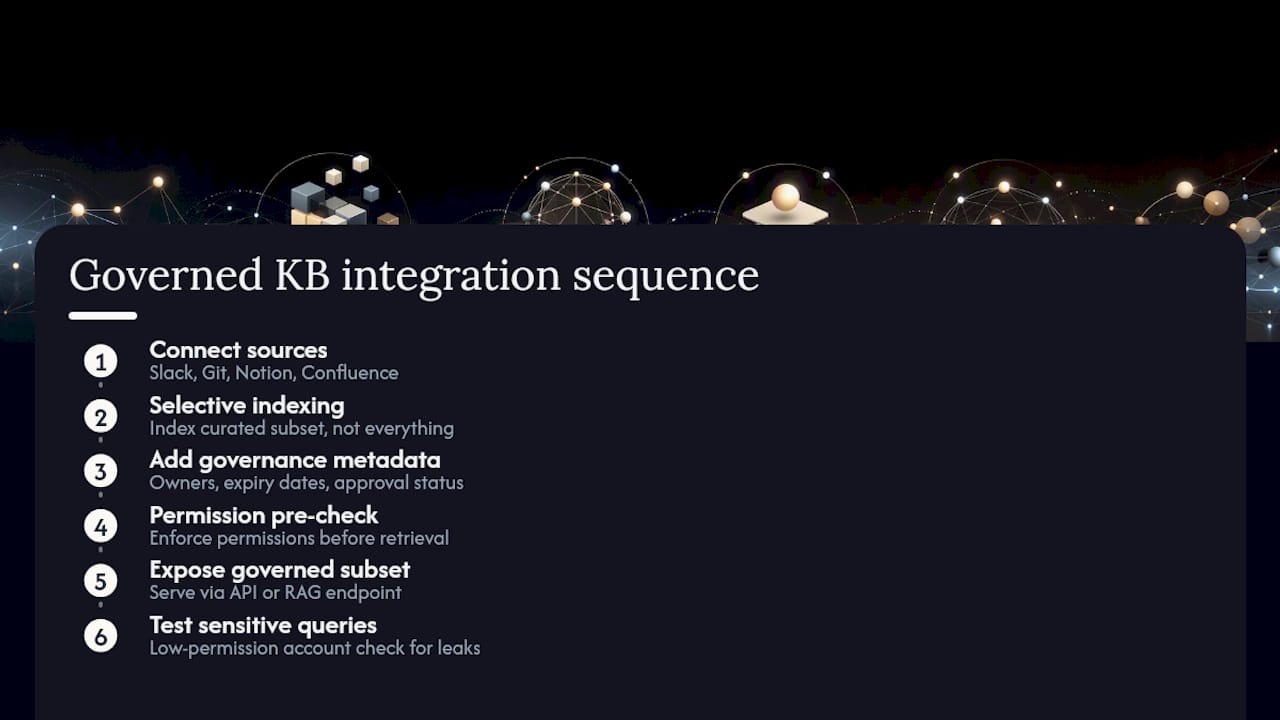
Permission scoping needs to travel with the content, not get bolted on afterward. If an HR-only article makes it into an unscoped RAG index, any employee’s AI assistant could surface HR-only information in a chat response, regardless of who’s actually allowed to see it. Wiring this correctly means the permission check happens before the retrieval, not after the answer is generated.
Pro Tip: Before you connect any AI assistant to your knowledge base, run a test query for something sensitive, like a compensation policy or an HR complaint process, from a low-permission test account. If the assistant surfaces it, your permission scoping isn’t wired correctly yet.
The practical integration sequence looks like this: connect your source systems (Slack, Git, Notion, Confluence, whatever holds your real content), index selectively rather than everything at once, and expose the governed subset through an API or RAG endpoint rather than a raw file dump. Platforms built specifically to unify scattered repositories into one governed layer, the kind RepoEngine describes, can stand up internal agents and even auto-generate onboarding handbooks from existing decision memory, often showing measurable time savings for senior staff within weeks rather than quarters. If your team is already exploring AI workflows more broadly, it’s worth reading how Moderatemurmurations approaches ChatGPT and assistant wiring for internal tools.
How Do You Know If People Are Actually Using It?
Adoption shows up in a few measurable signals long before anyone runs a formal survey: search click-through rate, dwell time on articles, and, most tellingly, a drop in direct messages to your subject-matter experts. If your engineering lead is still fielding the same five Slack questions every week, the KB isn’t doing its job yet, no matter how many articles exist.
Set up a simple improvement loop rather than treating launch as the finish line. Pull your zero-result search queries and your most-viewed-but-quickly-abandoned pages every month. Assign an owner to fix the gap. Measure whether the fix reduced repeat questions on that topic. That loop, run consistently, does more for long-term KB health than any one-time content push.
A large proportion of digital workers report difficulty finding the information they need to do their jobs, according to Gartner’s survey data. That’s the baseline your KB is working against, and it’s why even modest improvements in findability tend to show up quickly in fewer interruptions.
Tie your KB metrics to business outcomes leadership already tracks. If onboarding time drops because new hires can self-serve answers instead of waiting on a manager, that’s a recruiting and productivity win worth reporting in dollars, not just search analytics. If mean time to resolution (MTTR) on support tickets improves because agents can find troubleshooting steps faster, that’s a customer experience win. Knowledge base metrics matter to executives only when they’re translated into numbers those executives already report on.
How Do You Get Employees to Actually Adopt a New Knowledge Base?
The best-built knowledge base fails if nobody changes their habit of asking a coworker instead of searching. Adoption is a behavior change problem as much as a documentation problem, and it needs to be managed as one.
Start with visible executive sponsorship. When a team lead answers a Slack question by linking the KB article instead of typing out the answer again, that single action teaches the whole team the new default faster than any announcement email. Make that behavior expected, not optional, for managers during the first month.
Bake the KB into onboarding immediately. New hires have no existing habit of asking a specific coworker, which makes them the easiest group to convert to KB-first behavior. Give every new employee a short list of the top articles relevant to their role during week one, and make finding an answer there part of their onboarding checklist.
Reduce friction relentlessly. If search inside Slack or Teams returns KB results directly, adoption climbs because the KB meets people where they already work instead of asking them to open a new tab. If the tool feels like extra software to remember, most employees will quietly revert to messaging a coworker within a month.
Finally, close the loop publicly. When someone reports a gap and you fix it within a week, say so. A visible “you asked, we added it” habit builds trust in the system faster than any all-hands presentation ever will.
Author perspective: common pitfalls and practical shortcuts
The KBs I’ve seen fail almost always share one root cause: no single owner. Everyone agrees the wiki needs updating, and because everyone agrees, nobody actually does it. Assigning a named owner per category, even an imperfect one, beats a “the whole team owns it” model every time.
The second most common failure is over-scoping at launch. Teams try to migrate five years of scattered documentation before shipping anything, and the project stalls for months while people lose interest. Ship the top 20 questions first. Expand later, once you can see what people actually search for.
If you only take one shortcut from this article, make it this: put search where people already work. A knowledge base that lives in a separate tool nobody opens is worse than no knowledge base at all, because now leadership thinks the problem is solved when it isn’t. Wire it into Slack, watch the zero-result queries for a month, and let real usage tell you what to write next.
— Christopher
How Moderate Murmurations Can Help You Launch a Working Knowledge Base
Building a knowledge base from scratch usually stalls for one of two reasons: nobody has time to write the first 20 articles, or the tool selection process drags on for weeks while the real problem, people not finding answers, keeps costing hours every day. A provider can skip both bottlenecks by building the launch content and the integrations together, instead of handing you a blank tool and a to-do list.

A short engagement typically starts the way this article does: an audit of your team’s most repeated questions, named owners assigned per category, and a prioritized set of launch articles written in plain, findable language. From there, the service sets up the integrations that actually matter, connecting search to the tools your team already uses and wiring AI-ready structure in from day one instead of retrofitting governance later. The output isn’t a stack of unread documentation but often benefits from smart onboarding practices, as explained in how to implement a skills-based hiring framework that complements your knowledge base. It’s a working system people search before they message a coworker.
If your team already knows the top 20 questions eating everyone’s time but hasn’t found the hours to build the answer, book a free consultation with Moderatemurmurations and walk through a launch plan scoped to your team’s actual size and content.
Sources
- Gartner press release: 47% of digital workers struggle to find information
- Internal Knowledge Base: The Practical 2026 Guide | Docsio
- Internal Knowledge Base: How to Build One | HelpDocs
- Elium: Knowledge Management & AI Infrastructure for RAG
FAQ
What Is an Internal Knowledge Base?
An internal knowledge base is a permissioned, searchable repository of company information, SOPs, policies, and troubleshooting guides built for employees rather than customers, and it stays curated and access-controlled separately from any public-facing docs.
What Are Some Examples of Internal Knowledge Bases?
Common examples include an IT runbook for resolving outages, an HR policy hub covering benefits and time off, an onboarding library for new hires, and a sales operations wiki covering pricing rules and approval processes.
What Is an Example of a Knowledge Management System?
A knowledge management system is the broader platform, search engine, permissions, integrations, and governance tools, that hosts and organizes a knowledge base; examples include enterprise KM suites that combine answer-level search with version control and gap analytics.
What’s Another Term for Knowledge Base?
Common alternatives include “internal documentation hub,” “knowledge repository,” or “corporate knowledge base,” all referring to the same core idea of a centralized, curated source of company information.
How Long Does It Take to Launch a Useful Internal Knowledge Base?
A scoped launch covering the top 20 repeated questions, with named owners and basic integrations, can go live in about four weeks; full-scale migration of older documentation should happen later, after the core content proves useful.