3 Steps U.S. Clinics Must Take to Start a HIPAA Compliant Website
3 Steps U.S. Clinics Must Take to Start a HIPAA Compliant Website

Any practice, clinic, or wellness brand whose website collects, transmits, or stores protected health information must treat that site as part of its HIPAA environment, full stop. Before anything else, we recommend three moves: map every page that touches patient data, get signed Business Associate Agreements from your host and vendors, and force HTTPS/TLS across the entire domain. The checklist below walks through exactly how.
TL;DR:
- Any page that collects, transmits, or stores protected health information must be fully within the HIPAA environment, including forms, portals, and login areas.
- Hosting arrangements require written Business Associate Agreements, encryption at rest, isolated backups, and documented logging to meet HIPAA standards.
- Data flows from patient forms or portals must route directly into compliant systems, avoid unsecured emails, and limit PHI exposure through portal-first designs.
- Tracking tools like Google Analytics and Meta Pixel on patient-facing pages can disclose PHI unless covered by a BAA or removed entirely.
- Administrative controls such as unique logins, role-based permissions, MFA, and session timeouts are essential for secure website management and audit readiness.
Table of Contents
- What Actually Makes a Website Subject to HIPAA?
- Hosting, BAAs, and the Infrastructure Guarantees You Need in Writing
- Designing Forms and Data Flow That Don’t Leak PHI
- Trackers, Analytics Pixels, and the Privacy Trap Most Sites Fall Into
- Access Controls and Session Management for Website Administrators
- Audit Logs, Backups, and the Risk Analysis OCR Asks for First
- Secure Design That Doesn’t Feel Like a Compliance Wall
- Why Most HIPAA Website Failures Are Design Failures, Not Legal Ones
- How Moderate Murmurations Builds Secure, Patient-Ready Websites
- Sources
What Actually Makes a Website Subject to HIPAA?
HIPAA compliance for websites isn’t about the whole domain. It’s about wherever patient data flows. If a page collects, stores, or transmits protected health information (PHI), it falls under HIPAA. If it’s just a blog post about flu season, it doesn’t.
The touchpoints that almost always require safeguards:
- Intake and appointment request forms
- Patient portals and authenticated login areas
- Live chat widgets connected to a support inbox
- File upload fields (insurance cards, referrals, lab results)
- Appointment scheduling flows that store medical reason codes
- Any page a patient can only reach after logging in
A quick technician’s audit catches most of the gaps. Submit a test form and watch where the data actually lands. Open your browser’s network tab and check for third-party calls firing on that same page. Search your DNS records for old subdomains you forgot existed, campaign microsites are notorious for lingering years after a launch. Separating marketing-only content from PHI-handling pages keeps your compliance scope small and your maintenance burden manageable, which matters more than it sounds like it should once you’re the one paying a developer by the hour.
Hosting, BAAs, and the Infrastructure Guarantees You Need in Writing
Your web host is a business associate the moment PHI touches their servers, and a verbal assurance means nothing to an auditor. Before you sign anything, confirm these in writing:
- A signed Business Associate Agreement (BAA) that names the specific services covered, hosting, backups, email relay, and CDN, if applicable
- Encryption at rest for any database or file storage holding PHI, not just encryption in transit
- Isolated, encrypted backups stored separately from production, with documented retention
- Logging and monitoring the host can produce on request, not just promise
File the BAA where your compliance officer can retrieve it in minutes, not days, since OCR’s enforcement process often starts with a document request, and scrambling looks worse than the gap itself.
For smaller practices, a full HIPAA-dedicated host is sometimes overkill. A segmented approach, where marketing pages live on standard hosting and only the PHI-handling forms or portal route to a BAA-covered environment, often saves cost without cutting corners.
Designing Forms and Data Flow That Don’t Leak PHI
Most HIPAA violations on websites don’t come from hackers. They come from a form that quietly emails a patient’s symptoms to an unsecured inbox. The fix is architectural, not just procedural.
- Encrypt data in transit (TLS) and at rest in covered storage, never a spreadsheet on someone’s desktop
- Route submissions directly into a covered, BAA-backed system rather than a general email inbox
- Favor portal-first flows for anything beyond basic contact info, so sensitive details never touch a form at all
- Strip PHI from notification emails entirely. A message reading “You have a new patient message, log in to view” is safe; one quoting the patient’s actual question is not
- If you embed a third-party form widget, confirm it’s covered by a BAA, know exactly where it stores submissions, and set a retention policy rather than letting data sit indefinitely
NIST-aligned encryption guidance points to TLS 1.2 or higher as the baseline for transmission, with comparable standards expected for anything stored long-term.
Trackers, Analytics Pixels, and the Privacy Trap Most Sites Fall Into
Google Analytics and the Meta Pixel are probably the most common HIPAA violation on healthcare websites today, and most teams have no idea they’re running afoul of anything. HHS guidance on online tracking technologies makes clear that trackers on authenticated pages can capture IP addresses, appointment types, and search terms, and that counts as a disclosure of PHI if the vendor isn’t covered by a BAA.
Audit it yourself: open your browser’s developer tools, click the network tab, and load your patient portal or scheduling page. Anything calling out to a third-party domain is worth investigating. Remediation usually means removing the tracker from PHI pages, self-hosting an analytics alternative, or securing a BAA with the vendor if the relationship is genuinely necessary.

Pro Tip: A cookie consent banner does not fix this. Cookie banners address general privacy law, not HIPAA, and they don’t create a BAA out of thin air.
Access Controls and Session Management for Website Administrators
The Security Rule expects administrative and technical safeguards that limit who can touch PHI, and website admin panels are frequently overlooked in this planning.
- Unique login credentials for every staff member, never a shared “admin” account
- Role-based permissions, so a scheduling coordinator can’t access billing data
- Immediate deprovisioning the day someone leaves, not at the next quarterly review
- Multi-factor authentication (MFA) required for any admin-level or high-risk access
- Automatic session timeouts after a period of inactivity
Roughly six years is the retention window OCR expects for supporting audit documentation, so access logs need a home that outlasts your current hosting contract.
Audit Logs, Backups, and the Risk Analysis OCR Asks for First
When an investigation opens, the written risk analysis is usually the first document OCR requests, and it needs to name your website specifically, not just gesture at “IT systems” in general.
- Audit logs should capture who accessed what and when, kept for six years and reviewed on a set schedule, not just generated and forgotten
- Backups need encryption, offsite storage, and a restore test on the calendar, an untested backup is a hypothesis, not a safeguard
- Risk analysis should include a data-flow diagram of your website, a prioritized remediation list, and dated proof that fixes actually happened
- Incident response plans need clear containment steps and a decision tree for when breach notification to OCR and affected patients becomes legally required
Secure Design That Doesn’t Feel Like a Compliance Wall
Security controls don’t have to feel clinical. Reassuring microcopy next to a login field, progressive disclosure that asks sensitive questions only after trust is established, and calm visual design all reduce drop-off without weakening protection. On the development side, disable public indexing on staging subdomains and run pre-deploy checks that strip sample PHI before launch, ghost sites with old test data are a recurring reason audits fail. Pair that with staff training and a recurring audit calendar. For guidance on tone and visual choices that keep patients comfortable, our piece on building a wellness brand’s online presence covers the design side in more depth.
Why Most HIPAA Website Failures Are Design Failures, Not Legal Ones
The conventional advice treats HIPAA compliance as a legal checkbox exercise, hire a compliance consultant, sign some paperwork, move on. That’s backwards. Nearly every website HIPAA violation we’ve seen traced back to a design decision made months before any lawyer got involved: a form builder chosen because it was free, a notification email template nobody proofread for what it actually included, a staging subdomain someone forgot to lock down after a redesign.
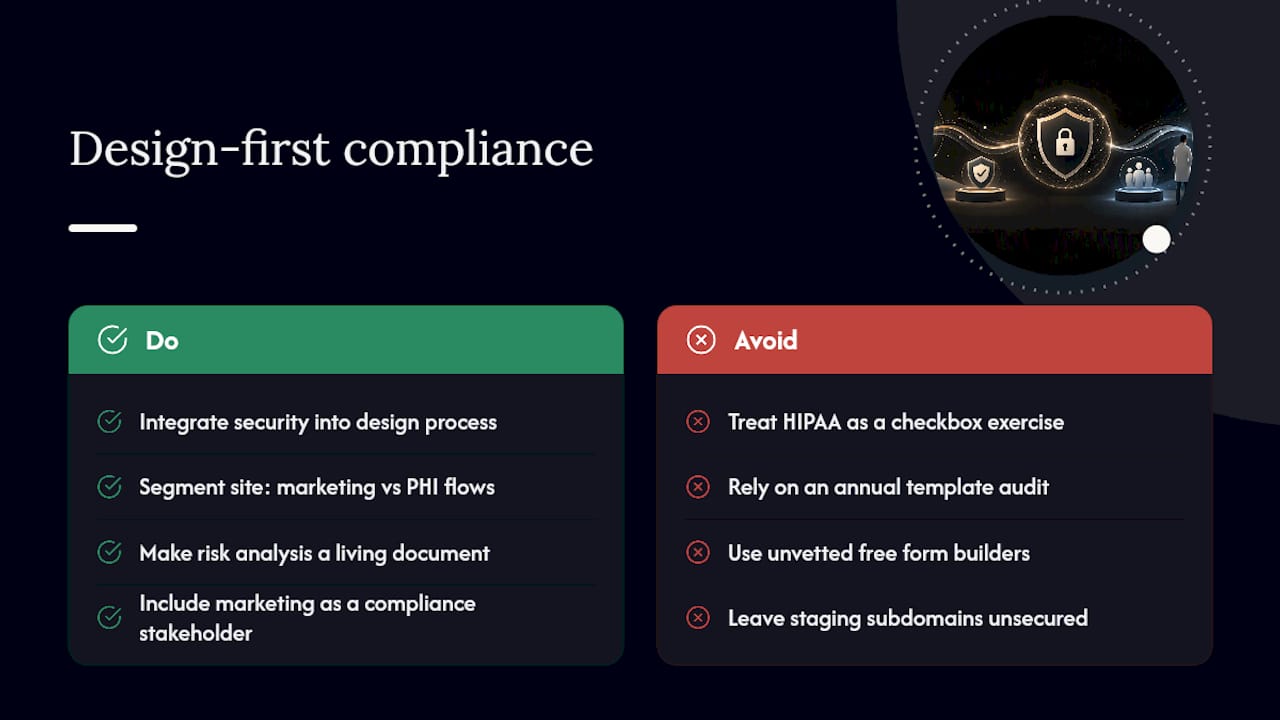
The uncomfortable truth is that OCR’s growing focus on tracking technologies means your marketing team is now a compliance stakeholder whether anyone told them or not. A pixel added by a well-meaning marketer chasing conversion data can create the same liability as a hosting provider without a BAA. Compliance can’t live solely in IT’s lane anymore.
What actually works is building security into the design process itself, not layering it on afterward. A well-scoped, segmented site (marketing pages on standard hosting, PHI flows on covered infrastructure) is often both cheaper and safer than a blanket “everything must be HIPAA hosted” approach that burns budget without reducing real risk. The teams that get this right treat their risk analysis as a living document tied to their actual site, not a template pulled off the internet once a year to satisfy an auditor.
— Christopher
How Moderate Murmurations Builds Secure, Patient-Ready Websites
If auditing forms, chasing down BAAs, and rewriting notification email templates sounds like more than your team has bandwidth for, that’s exactly the gap Moderatemurmurations closes for wellness brands and healthcare providers who want it handled correctly the first time.

We coordinate secure hosting arrangements, help negotiate the BAAs your host and form vendors need to sign, and build patient-facing forms and portal flows with MFA and encryption baked in from the start, without the site feeling like a locked vault. A free consultation starts with a walkthrough of your current site’s PHI touchpoints, followed by a clear scope of what needs fixing and what’s already solid. From there, deliverables typically include a remediation plan, secure form architecture, and copy that keeps the patient experience warm even where security requirements tighten. If your current site handles any patient data at all, book a consultation with Moderatemurmurations and get a straight answer on where you stand.
This article is general information, not a substitute for advice from a qualified doctor. Consult a qualified healthcare professional about your own circumstances before acting on anything here.