One Session to Fix Your Google Business Profile for Small Businesses
One Session to Fix Your Google Business Profile for Small Businesses

Claim and verify your Google Business Profile, complete every field with accurate information, and prioritize reviews, photos, and clear conversion paths like booking links or click-to-call. Those three moves produce the fastest gains in local visibility and customer action, and everything else in this guide builds on them.
TL;DR:
- Claim and verify your profile promptly to unlock editing, responding to reviews, and adding photos, with postcard and phone verification being the most common methods.
- Ensure your business name, address, and phone number are consistent across all platforms to strengthen Google’s trust signals and improve relevance.
- Fill out every profile field accurately, including primary category, attributes, hours, and service details, to boost visibility and customer trust.
- Regularly upload fresh photos and videos of your storefront, team, and services to increase engagement and search visibility.
- Focus on accumulating recent, high-quality reviews and respond to all reviews within 48 hours to strengthen your prominence and attract new customers.
Table of Contents
- What Does Google Business Profile Optimization Actually Mean?
- Claiming and Verifying Your Business Profile
- Filling Out Every Profile Field the Right Way
- Photos and Videos That Make People Click
- Getting and Managing Reviews Without the Guesswork
- Listing Services, Products, and Booking Links
- Using Posts and Q&A to Keep Your Profile Active
- Keeping Hours and Details Accurate Year-Round
- Tracking What Your Profile Actually Produces
- Mistakes That Quietly Sink a Good Profile
- A One-Session Audit Checklist From Moderate Murmurations
- Why I Tell Clients to Start With Reviews, Not Photos
- How Moderate Murmurations Handles This So You Don’t Have To
- Where to Verify These Practices Yourself
- Sources
What Does Google Business Profile Optimization Actually Mean?
Google Business Profile optimization means systematically filling out, verifying, and maintaining every element of your free listing so it matches more searches and converts more of the people who find it. Some business owners still call this “Google My Business optimization,” a holdover from before Google rebranded the tool in 2021. The name changed. The mechanics didn’t.
Google’s own guidance says local ranking comes down to three factors: relevance, distance, and prominence. You control the first and third. Relevance is how well your profile matches what someone typed into the search bar, which depends almost entirely on how completely and accurately you’ve filled out your listing. Prominence is how well known and how well reviewed your business is, both online and off.
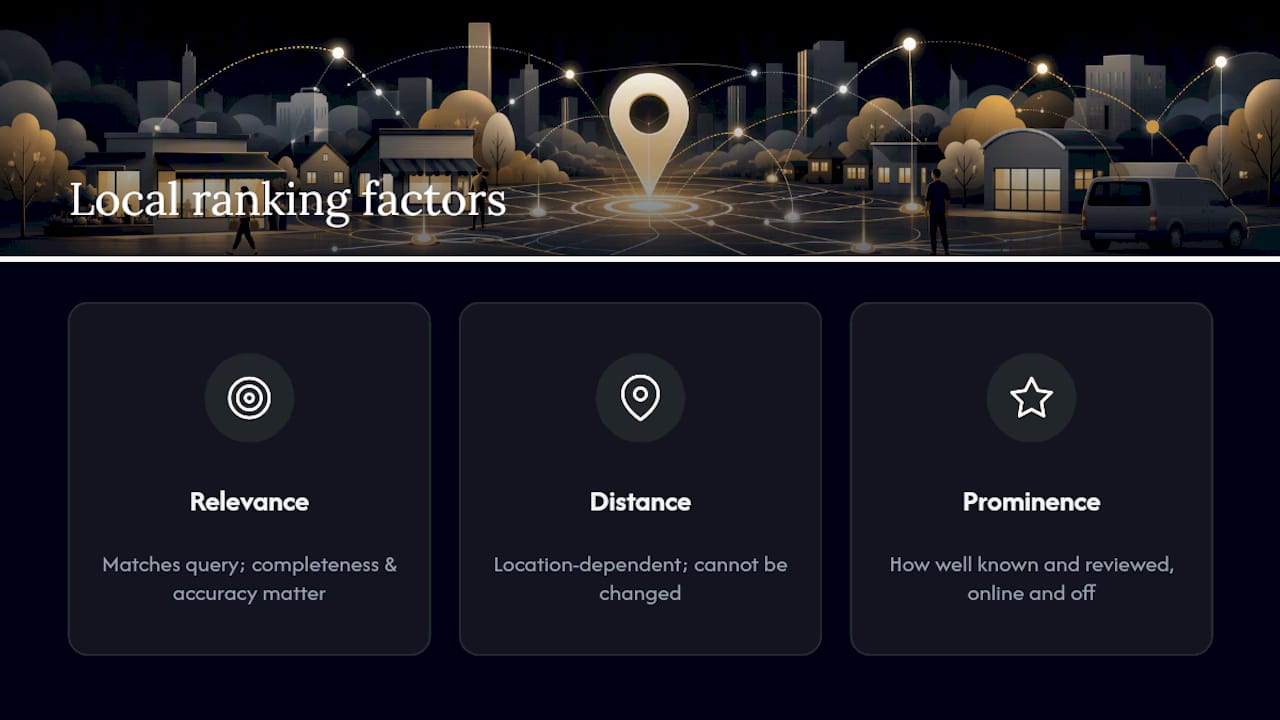
Distance you can’t touch. A searcher three miles away will see a different set of results than one three blocks away, and no amount of optimization changes that. But relevance and prominence are entirely within your control, and they’re where a single focused work session pays off fastest.
Claiming and Verifying Your Business Profile
Claiming and verifying are not the same step, even though people use the terms interchangeably. Claiming just means you’ve told Google “this is my business” and requested management access. Verification is Google confirming you’re telling the truth, usually by mail, phone, email, or an instant video check tied to your Search Console history.
An unverified profile can still exist and even show up in search results, but you can’t edit it, respond to reviews, or add photos. Verification is the gate that unlocks every other tactic in this article.
- Postcard verification sends a code to your business address by mail, typically within five days, and remains the most common method for new listings.
- Phone or email verification is faster when Google offers it, often resolving in minutes.
- Instant verification applies if your business is already confirmed through Google Search Console for the same address.
- Video verification has become more common for service-area businesses without a public storefront.
If verification stalls or gets rejected, don’t resubmit blindly. Check for name or address mismatches with your website first, since that’s the most common cause of a stuck request.
Once verified, set roles carefully. The account owner should be someone permanent, like the business itself, not a marketing contractor who might disappear. Add staff as managers so they can post updates and answer reviews without holding the keys to the whole account. If you ever lose access, Google’s ownership transfer and recovery process exists specifically for this, though it can take days to resolve, so don’t wait until a rebrand or a lost employee to figure it out.
Filling Out Every Profile Field the Right Way
This is the section where most profiles quietly lose visibility, because incomplete or inconsistent fields are invisible to the owner but very visible to Google’s matching algorithm.
Start with your primary category. This single dropdown choice does more to steer which searches you show up for than almost anything else on the profile. A plumber who selects “Contractor” instead of “Plumber” is handing relevance to competitors who picked correctly. Choose the most specific, accurate category available, then add secondary categories only for services you genuinely offer.
Next, your name, address, and phone number (commonly shortened to NAP) need to match your website and any other directory listing character for character. “St.” on your website and “Street” on your profile is a small inconsistency that can dilute the prominence signal Google uses to trust your business information.
- Use your real, registered business name. No keyword stuffing like “Smith Plumbing Best Emergency 24/7.”
- List a phone number that rings directly to your business, not a call center or tracking number that disappears in a rebrand.
- Match your website URL exactly, including the “www” or lack of it, to avoid confusing crawlers.
If you serve customers at their location rather than a storefront, mark yourself as a service-area business and hide your street address. Showing a home address for a service business creates confusion for customers and can violate Google’s policies.
Fill in every attribute available to your category. Attributes like “wheelchair accessible,” “free Wi-Fi,” or “women-owned” seem minor individually, but collectively they signal to Google that your listing is complete, current, and worth trusting more than a competitor’s half-finished one. Set your regular hours precisely, and don’t skip special hours for holidays. A wrong hour listed on Thanksgiving sends someone to a locked door, and that frustration often becomes a one-star review.
Pro Tip: Set your opening date field even if your business has operated for years. It has no bearing on ranking, but it appears on your profile and adds another point of factual completeness Google’s system can verify against.
Photos and Videos That Make People Click
A profile with fresh, real photos gets more attention than one with a single logo image from three years ago. Google and BrightLocal both point to visual content as one of the most under-used levers in Google Business Profile optimization, largely because it’s easy to do and most businesses simply don’t bother.
Upload photos in this order of impact:
- Exterior/storefront shots so customers recognize your location on arrival, taken in daylight from the street.
- Interior and team photos that show real people doing the work, not stock imagery.
- Product or project shots, including before-and-afters for services like landscaping, renovation, or auto detailing.
- Customers-in-action shots, when you have permission, since they build trust faster than staged photography.
Keep images at least 720 by 720 pixels, under 5MB, and in JPG or PNG format. Add one new photo every couple of weeks rather than dumping twenty at once. That steady drip signals an active business and gives you fresh material to caption with a location or service keyword naturally, not stuffed. A 30-second video walking through your space or showing a service in progress adds another layer of trust that static images can’t match.
Getting and Managing Reviews Without the Guesswork
Reviews do double duty. They feed the prominence signal Google uses for ranking, and they’re often the single biggest factor in whether a stranger picks up the phone. A five-star average with three reviews from 2022 reads as abandoned. A 4.7 average with new reviews every month reads as alive.
- Ask at the right moment. The best time is right after a job finishes or a purchase completes, while the experience is still fresh.
- Send a direct link, not a vague request to “leave us a review.” Your profile’s share link takes customers straight to the review box, removing every extra click that causes people to abandon the process.
- Follow up once, by text or email, about a week later if the first ask didn’t land. Don’t chase harder than that.
- Respond to every review within 48 hours where possible, positive or negative.
For positive reviews, thank the customer by name and mention a specific detail from their comment. It shows you actually read it. For negative reviews, acknowledge the issue without getting defensive, state what you’ll do about it, and take the conversation offline with a phone number or email. Future customers read your response more than they read the complaint itself.
Pro Tip: Never offer a discount or refund in a public review reply. Say “please call us so we can make this right” instead, then handle specifics privately. Public negotiation invites more of it.
If a review violates Google’s policies, such as fake reviews from a competitor or content unrelated to an actual customer experience, you can flag it directly from your dashboard. Resolution isn’t instant, and Google doesn’t guarantee removal, so don’t build your reputation strategy around disputing bad reviews instead of earning good ones.
Listing Services, Products, and Booking Links
A visitor who lands on your profile should understand what you sell and how to buy it within five seconds. That’s the entire job of the Services, Products, and Menu sections.
Use Services for anything appointment-based or quote-based, like HVAC repair, tax prep, or personal training. Use Products for anything with a fixed price a customer buys directly, like retail goods. Restaurants and cafes get a dedicated Menu feature instead.
- Name each service the way a customer would search for it, not the way you’d describe it internally. “Emergency drain cleaning” beats “drain services” every time.
- Add a short description and price range where you’re comfortable sharing one, since transparency reduces hesitation.
- Connect a booking link if you use scheduling software that integrates with Google, or at minimum link to a contact or quote-request page.
A well-optimized profile functions as both a ranking asset and a conversion tool, and the services section is where that shows up most directly. Clear offerings with an obvious next step turn a browsing searcher into an actual lead, which is the entire point of showing up in the first place.
Using Posts and Q&A to Keep Your Profile Active
Posts are the closest thing your profile has to a social media feed, and they matter more than most owners realize because they signal activity to both Google and human visitors.
- Post a weekly or biweekly update covering promotions, new services, or seasonal hours.
- Use event posts for anything time-bound, like a holiday sale or a workshop.
- Repurpose blog content you’ve already written into shorter post-friendly summaries.
The Questions & Answers section deserves more attention than it gets. Seed it yourself with the three or four questions customers actually ask, like “Do you offer free estimates?” or “Is parking available?” Answer them yourself with a business account so the response carries authority, rather than leaving it to whichever stranger answers first. An unanswered question sitting for months looks neglected to anyone who scrolls past it.
Keeping Hours and Details Accurate Year-Round
Set special hours ahead of every major holiday, and update them the moment your schedule changes, not the week after. If you’re closing temporarily for renovations, illness, or a move, mark the business as temporarily closed rather than leaving stale hours up.
Build a quarterly audit into your calendar: confirm hours, check that your phone number still rings correctly, and scan for stray photos or outdated posts. Ten minutes a quarter prevents most of the friction that drives one-star reviews about wrong hours.
Tracking What Your Profile Actually Produces
Your Business Profile dashboard, managed through Business, tracks the numbers that tell you whether all this work is paying off.
- Searches and views, split between direct searches for your name and discovery searches for your category or service.
- Website clicks, phone calls, and direction requests, the three actions that most directly precede revenue.
- Booking clicks, if you’ve connected a scheduling tool.
Watch trends over months, not days. A dip during a slow season isn’t a red flag, but a steady month-over-month decline in calls is worth investigating. Pairing this data with Google Analytics on your own site shows you what happens after someone clicks through, closing the loop between the profile and the sale.
Mistakes That Quietly Sink a Good Profile
Most of the damage done to a Business Profile isn’t dramatic. It’s small inconsistencies that pile up.
- Wrong or overly broad category selection that pulls in irrelevant searches instead of qualified ones.
- Inconsistent name, address, or phone number across your website and other directories, which erodes the trust signal Google uses for prominence.
- Broken booking or website links that quietly cost you leads for weeks before anyone notices.
- Keyword-stuffed business names or descriptions, which violate Google’s guidelines and can trigger a suspension.
- Ignored reviews and unanswered questions, which read as an abandoned business to anyone comparing you against a competitor.
Google is explicit that there’s no way to pay or request your way into a higher local ranking. The only path is consistent adherence to best practices over time, which makes fixing these mistakes far more valuable than chasing shortcuts that don’t exist.
A One-Session Audit Checklist From Moderate Murmurations
We built this checklist from the same sequence we run for clients: fix the fast wins first, then layer in ongoing habits.
Fast wins (do today): verify your listing, correct your category, fix any NAP mismatch, add five current photos.
Next steps (this week): write service descriptions with real search terms, add a booking or contact link, respond to every unanswered review.
Ongoing (monthly): post an update, seed a new Q&A, check your insights dashboard for trends.
We’ve seen a rewritten service description move a client from vague (“home services”) to specific (“same-day water heater replacement”) and watched call volume respond within a month. A restaurant client swapped a five-year-old exterior photo for a current one and saw profile views climb noticeably the following quarter. Small, targeted changes tend to outperform a total overhaul.
Why I Tell Clients to Start With Reviews, Not Photos
Most guides tell you to start with photos because they’re satisfying and visual. I’d argue reviews matter more in week one, because they feed the prominence signal Google actually ranks on, while photos mostly influence click-through once you’re already visible. Fix verification, category, and NAP consistency first. Layer reviews and photos in over the following weeks. If you’re past two hours with no traction, that’s usually the signal to bring in help rather than keep guessing.
— Christopher
How Moderate Murmurations Handles This So You Don’t Have To
Moderatemurmurations is the alternative to hiring a traditional marketing agency for Google Business Profile work. You get a done-for-you audit and fix, not a retainer that drags on for months while you wait for updates.

We rewrite your service descriptions to match real search terms, source and caption photos that actually convert, connect booking links to your scheduling tool, and make sure your profile matches your website down to the address format. That last piece matters more than most owners realize. A profile that contradicts your website’s own launch checklist confuses Google and customers alike.
A consultation with us starts with a quick audit of your current profile against the checklist above, followed by a plan for what to fix first and what to hand off entirely. If you’d rather spend your time running the business than fighting with dropdown menus, book a free consultation and we’ll walk you through exactly where your profile is losing ground.
Where to Verify These Practices Yourself
Google’s own local ranking guidance is the definitive source for how relevance, distance, and prominence work. For a broader look at local visibility beyond your profile, our local SEO guide covers the citation and website signals that work alongside it.
Sources
- Tips to improve your local ranking on Google - Google Business Profile Help
- How to Optimize Your Google Business Profile in 2026 - QuickSprout
- Google Business Profile Optimization - BrightLocal