Custom GPTs for Small Businesses: Build or Hire
Custom GPTs for Small Businesses: Build or Hire

Custom GPTs are configurable, no-code versions of ChatGPT that function like a branded, always-available AI team member — purpose-built to handle specific tasks with consistent tone, curated knowledge, and optional connections to your existing tools. For small businesses and creators, that means repeatable marketing tasks, on-brand copy generation, and support workflows that no longer depend on anyone remembering the right prompt.
Three benefits stand out immediately:
- Systematized brand voice: Instructions lock in your tone, vocabulary, and content rules so every output sounds like you, not a generic AI.
- Repeatable task automation: From SEO meta copy to onboarding checklists, a well-built GPT handles high-frequency tasks without re-prompting from scratch.
- API and workflow integrations: Via Actions, a GPT can call external services, pull live data, or trigger steps in your digital systems.
One privacy note worth knowing upfront: conversations on Business, Enterprise, and Edu plans are not used by OpenAI to train its models by default. Consumer plan users may need to opt out manually in their account settings.
Table of Contents
- What can custom GPTs actually do for your business?
- How does a custom GPT actually work inside?
- Step-by-step: how to build and deploy a business-ready GPT
- What you need to know about privacy and data security
- Should you build it yourself or hire a pro?
- What does it cost, and how long does it take?
- Key Takeaways
- What I’ve seen work, and what people get wrong
- Moderatemurmurations builds GPT-enabled digital systems for you
- Useful sources and further reading
What can custom GPTs actually do for your business?
The most useful way to think about personalized GPT models is by role. What task, if handled consistently and instantly, would save you the most time each week?
For website and content work, a GPT built around your brand guidelines can draft landing page copy, generate SEO meta descriptions, write A/B test variants, or produce a month of social captions in one session. Creators use similar setups for product launch checklists, course outline drafts, and image prompt generation for branded visual assets.
On the operational side, GPTs for specific tasks shine in customer support: formatting resolved tickets into help articles, drafting FAQ responses in your brand voice, or guiding a contractor through an onboarding checklist without a team member present. The process optimization gains here are real, especially for teams of one to five people where every repeated task has a direct cost.
Pro Tip: Start with the single task you repeat most often. Build a narrow GPT for that one job, run it for two weeks, and measure time saved before expanding scope.
How does a custom GPT actually work inside?
A custom GPT has four configurable layers, each serving a distinct purpose.
- Instructions define behavior: what the GPT does, how it responds, what it avoids, and what tone it uses. These apply to every conversation.
- Knowledge files give the GPT reference material to draw from — handbooks, brand guides, procedures, or internal documentation. They work best for curated, up-to-date content; uploading disorganized archives increases hallucination risk.
- Capabilities extend what the GPT can do: web search, image generation, code execution, depending on your plan and region.
- Actions connect the GPT to external APIs you define, letting it retrieve live data or trigger workflows in your digital systems.
The Configuration view is where professional-grade behavior gets locked in. The conversational builder is useful for drafting, but for business-critical workflows, Configuration is where you tighten system prompts, set the recommended model, toggle capabilities, and authenticate API connections. Relying only on the conversational draft is not enough for reliable, repeatable outputs.
Here is the basic flow: a user sends a prompt → the GPT applies its Instructions and draws from Knowledge files → Capabilities and Actions execute if needed → a response is returned. That chain runs the same way every session, which is exactly what makes it useful for AI workflow design.
Step-by-step: how to build and deploy a business-ready GPT
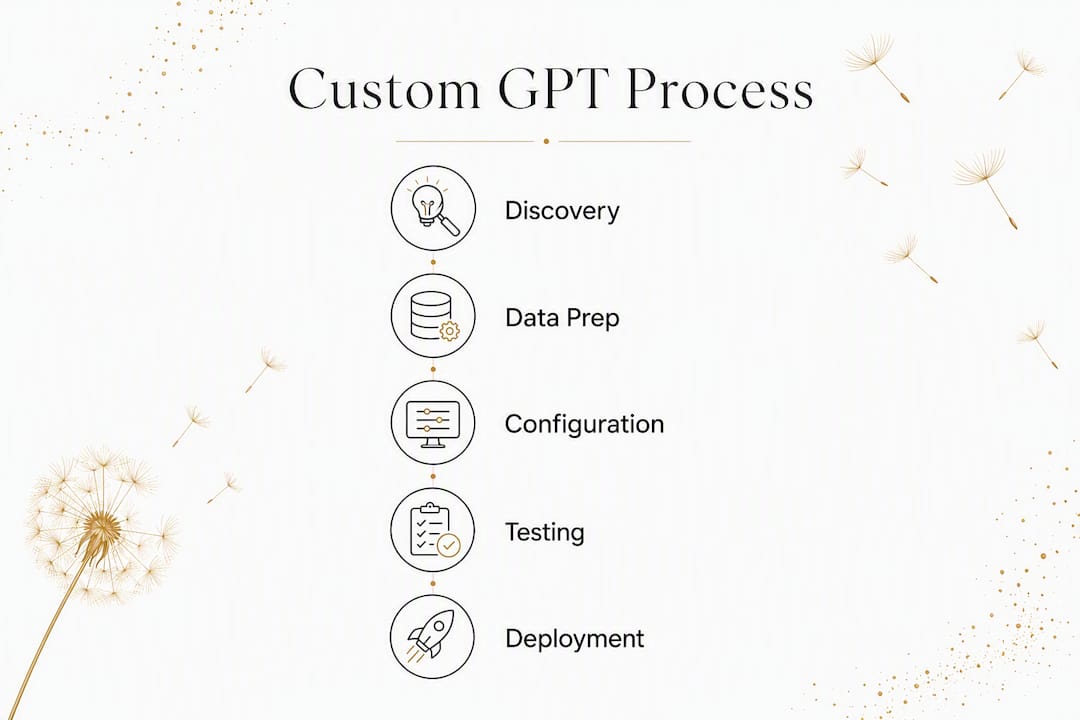
- Scope the use case. Pick one high-value, repeatable task. Define what “good” looks like: time saved, output quality, or consistency with your brand voice.
- Curate your data. Gather only the files the GPT genuinely needs: brand guidelines, approved copy samples, procedure docs. Remove outdated or off-topic material before uploading.
- Configure, don’t just converse. Write tight Instructions with scenario-based examples. Add conversation starters that reflect real user needs. Set the recommended model and enable only the capabilities your use case requires.
- Test with 10–15 eval questions. OpenAI recommends writing representative questions with correct answers, then adjusting Instructions or Knowledge files based on gaps. Use the built-in Preview for this.
- Fix instructions before adding files. If outputs are off, add scenario examples to Instructions first. This resolves accuracy issues faster than uploading more knowledge files.
- Deploy with the right access settings. Choose private (just you), workspace (your team), or public via the GPT Store. In managed workspaces, administrators control sharing and propagation.
- Schedule maintenance. Set a monthly review: check for outdated knowledge files, review edge-case failures, and update Instructions as your business evolves.
What you need to know about privacy and data security
Privacy rules for custom GPTs depend on your plan, and the difference matters for U.S. small businesses handling client data.
| Plan | Training data use | Admin controls |
|---|---|---|
| Consumer (Free/Plus) | May be used to train models; opt-out available in settings | Limited |
| ChatGPT Business | Not used to train models by default | Workspace-level controls |
| Enterprise / Edu | Not used to train models by default | Full admin controls, managed sharing |
When a GPT uses Actions to call external APIs, relevant parts of user input may be sent to those third-party services. OpenAI does not audit third-party storage or use, so the responsibility for choosing trustworthy integrations falls on the builder.
A practical security checklist before you publish:
- Restrict workspace access to only the people who need the GPT.
- Store API credentials in a secrets manager, never in the Instructions field.
- Upload only the minimum data needed (data minimization).
- Define a retention policy for any data the GPT processes through Actions.
- Review third-party API terms before connecting them.
Should you build it yourself or hire a pro?
The honest answer depends on three factors: technical complexity, data sensitivity, and your capacity for ongoing maintenance.
Build it yourself when:
- The use case is a single, well-defined task (e.g., brand copy drafts).
- No external API connections are needed.
- You have time to run evals and iterate over a few weeks.
Hire a specialist when:
- The GPT needs Actions/API integrations tied to your website or CRM.
- You are handling sensitive client data and need a proper security review.
- You need a fast, polished result with documentation your team can maintain.
Note that GPTs live inside ChatGPT — they are not a way to embed an assistant directly on your website. If you need a chat widget on your site, that requires the OpenAI API and developer integration, which is a different scope and cost entirely.
When evaluating a vendor, ask: Do they have examples of Actions/API integrations? What does their QA process look like? How do they handle knowledge file curation and updates? What are their data handling policies? A good provider delivers scoped use cases, curated knowledge files, instruction tuning, security setup, tested evals, and handoff documentation. Professional prompt engineering services can also support the instruction-writing phase if you are building in-house but want expert guidance.

What does it cost, and how long does it take?
| Stage | Typical timeline |
|---|---|
| Discovery and scoping | 3–5 days |
| Data curation and configuration | 1–2 weeks |
| Testing and QA | 3–5 days |
| Deployment and access setup | 1–2 days |
| Ongoing maintenance | Monthly review |
For a single-use-case GPT with no API integrations, a DIY build typically takes a few weeks from scoping to deployment, assuming you have your source files ready. The main cost is your time and a paid ChatGPT plan (required for building GPTs).
A basic vendor implementation for a single-task GPT with curated knowledge and tested evals generally runs in the range of a few hundred to a few thousand dollars, depending on iteration cycles and documentation requirements. Add Actions/API integrations, and the scope and cost increase accordingly. Engineering support for API integrations is a separate line item for complex workflows. Enterprise-grade builds with security reviews, multi-task scope, and ongoing support sit at the higher end of that range.
Key Takeaways
A well-scoped custom GPT built on curated knowledge and tight instructions is the most practical way for small businesses to systematize brand voice and reduce time spent on repeatable tasks.
| Point | Details |
|---|---|
| Start narrow | Pick one repeatable task, build a focused GPT, and measure results before expanding. |
| Curate before you upload | Only upload clean, current files; disorganized archives increase hallucination risk. |
| Test with 10–15 questions | Write eval questions with correct answers and fix Instructions before adding more files. |
| Check your plan’s privacy rules | Business and Enterprise plans exclude conversations from model training by default; consumer plans require manual opt-out. |
| Moderatemurmurations builds these for you | From scoping and knowledge curation to QA and handoff, Moderatemurmurations delivers GPT-enabled digital systems for small businesses and creators. |
What I’ve seen work, and what people get wrong
Most small business owners who struggle with custom GPTs make the same mistake: they treat the Knowledge file upload like a filing cabinet dump. They upload everything, assume the GPT will sort it out, and then wonder why outputs are inconsistent. The GPT is not searching your files the way Google searches the web. It draws on what it finds relevant in the moment, and if your files are a mix of outdated drafts, off-topic documents, and contradictory guidelines, the outputs will reflect that chaos.
The businesses that get real value from these tools do the opposite. They spend more time on Instructions than on files. They write scenario examples directly into the system prompt. They run evals before they deploy anything. That discipline is what separates a GPT that saves ten hours a week from one that gets abandoned after two.
The other thing people underestimate is maintenance. A GPT built on your January brand guidelines will drift out of alignment by Q3 if no one updates it. Treat it like any other business system: schedule a monthly review, update the knowledge files when your offerings change, and revisit the Instructions when you notice output quality slipping.
Moderatemurmurations builds GPT-enabled digital systems for you
Skipping the trial-and-error phase has real value when your time is the constraint. Moderatemurmurations handles the full build: scoping your highest-impact use case, curating and structuring your knowledge files, writing and testing the Instructions, setting up any required integrations, running QA evals, and handing off documentation your team can actually use. The result is a GPT that sounds like your brand, handles your specific tasks, and is ready to maintain.

This is built for small business owners, creators, wellness brands, and service providers who need a polished, reliable AI system without spending weeks figuring out configuration. If you are ready to put your most repetitive tasks on autopilot, book a free consultation and we will scope the right build for your business.
Useful sources and further reading
- Introducing GPTs — OpenAI’s original announcement explaining what custom GPTs are, how they differ from standard ChatGPT, and the business case for building them.
- Creating and editing GPTs — The primary OpenAI Help Center reference for Configuration view, Instructions, Knowledge, Capabilities, Actions, and version history. Start here for technical setup.
- GPTs in ChatGPT — Covers plan-dependent privacy rules, workspace sharing settings, Actions data flow, and the GPT Store publishing process.
- Custom GPTs Resource — OpenAI Academy’s practical guide on eval methodology, testing best practices, and iterative tuning for business use cases.
- Explore GPTs — Browse published GPTs to see real examples of scoped, task-specific builds before you start your own.