Activate Clients in 5–14 Days: Copyable Client Onboarding Checklist for SMBs
Activate Clients in 5–14 Days: Copyable Client Onboarding Checklist for SMBs

The fastest way to standardize client onboarding is a seven-phase checklist: pre-flight, welcome, intake, documents and access, contracts and payment, kickoff, and a 30-day review. Firms that run this model with a single portal and light automation typically activate new clients in about one to two weeks, catch missing details before they cause delays, and give every client the same clear, calm experience from day one.
TL;DR:
- Automating repetitive tasks like welcome messages, intake reminders, and document requests saves admin time and maintains client trust, but key interactions like kickoff calls should stay human.
- Sending a clear, named document request reduces back-and-forth delays, and requiring signed contracts and payment before starting work prevents scope creep.
- The onboarding process should be completed within five to seven days on average, with escalation stages in place for missed deadlines to preserve momentum.
- Tracking three core KPIs—time-to-activation, intake completion rate, and 30-day retention—helps identify onboarding inefficiencies and guide improvements.
- Starting with a simple, proven checklist and gradually automating allows teams to adapt the process effectively without overcomplicating early stages.
Table of Contents
- Client Onboarding Checklist: The Seven Phases
- Client Onboarding Template: What To Copy And Send
- Client Onboarding Automation: What To Automate And What To Leave Human
- Client Onboarding Timeline: Day 0 To Day 30
- Client Onboarding Metrics And Common Mistakes
- How Moderate Murmurations Puts This Checklist To Work
- What Good Client Onboarding Goals And KPIs Look Like
- Common Client Onboarding Challenges And How To Fix Them
- Personalization Strategies For Different Client Types
- Compliance And Data Privacy During Onboarding
- A Practical Note On Getting Started
- Ready To Build This Into Your Own Systems?
- A Few More Places To Look
- Sources
Client Onboarding Checklist: The Seven Phases
A good client onboarding checklist isn’t a single document. It’s a sequence, with an owner and a clear “done” signal at each step, so nothing depends on someone remembering to follow up. Here’s the phased structure, built from the patterns that show up across the strongest onboarding playbooks.
Phase 0: Internal pre-flight. Before the client sees anything, confirm scope against the signed proposal, assign an internal owner, and create the project folder or workspace from a template. This preparatory step helps prevent confusion later.
Phase 1: Welcome. Send the welcome email or portal link promptly after the deal closing. Include one piece of instant value, something the client can use immediately, like a short prep guide or a resource list, and name the single point of contact by name and title.
Phase 2: Discovery intake. Send a structured questionnaire that takes around 10 to 15 minutes to complete, with a deadline of a few days to encourage timely responses. A phased onboarding playbook that moves from welcome through discovery, documents, access, kickoff, and handoff lets firms finish core onboarding in 5 to 7 days, and the top performers do it in 5 days or fewer using one client portal and consistent automation.
Phase 3: Documents and credentials. Request each file by name, specify the needed format, and use a secure upload method instead of email attachments. Track status visibly so the client and your team both know what’s outstanding.
Phase 4: Contracts and payment. Send the e-signature request and collect payment, or at minimum a valid payment method, before any billable work begins. This single step prevents more scope disputes than any clause in the contract itself.
Phase 5: Kickoff call. Run a focused 30 to 45 minute call to confirm goals, deliverables, and timelines out loud, not just in writing. This is where misunderstandings surface while they’re still cheap to fix.
Phase 6: Internal handoff and readiness check. Before work officially starts, confirm the team has access, roles are assigned, and internal tasks are logged. Nothing kills momentum faster than a kickoff call followed by a week of “waiting on access.”
Phase 7: First-week and 30-day check. Schedule a short review early, then again at 30 days. Both Ditch Manual and Assembly’s onboarding guidance point to the 30-day check-in as one of the most effective ways to catch issues while they’re still small.
Here’s the same sequence as a copyable list for your project management tool:
- Confirm scope and assign internal owner
- Create project folder or workspace
- Send welcome message and portal link
- Name the single point of contact
- Send discovery questionnaire (3-day deadline)
- Request named documents and credentials
- Send e-signature and collect payment
- Confirm internal access and role assignments
- Hold kickoff call and confirm deliverables
- Schedule first-week and 30-day reviews
Pro Tip: Don’t build your checklist to cover every possible edge case on day one. Ship the minimal version, run it with three or four real clients, and add steps only where you actually saw friction. A shorter checklist that gets followed beats a thorough one that gets skipped.
Client Onboarding Template: What To Copy And Send
The right template does most of the thinking for you. Here’s what belongs in each one.
- Business name and legal entity
- Primary and secondary contacts (name, role, email, phone)
- Top three goals for this engagement
- Existing credentials or accounts you’ll need access to
- Available windows for calls or reviews
Welcome-email bullets:
- What just happened (their project is officially starting)
- What to expect next and by when
- Who their point of contact is and how to reach them
- One immediate resource they can use today
Named document requests work far better than vague ones. A table like this removes the guesswork:
A short 10 to 15 item checklist, copied straight into your CRM or project tool, is often enough to run the first version of this system without any custom build. HubSpot’s free onboarding templates are a solid starting point if you want a pre-built version to adapt.
Client Onboarding Automation: What To Automate And What To Leave Human
Automation should handle repetition, not relationships. The tasks worth automating are the ones that are predictable and low-stakes: welcome messages, intake reminders, and document nudges.
- Automate: welcome message sent the moment a deal closes
- Automate: intake reminders on day 3, day 7, and day 10 if the form isn’t done
- Automate: named-document reminders tied to the deadline in your request table
- Automate: e-signature completion triggering an invoice, which in turn triggers account creation
- Keep human: the kickoff call, any pricing or scope negotiation, and handling exceptions
A typical flow looks like this: intake form submission creates a project in your PM tool and populates the portal automatically. Signature completion fires an invoice, and paid invoice status triggers account or workspace creation. OnboardMap’s research on automation suggests this kind of setup recovers a large share of onboarding admin time while keeping the trust-building moments, like the kickoff call, fully human.
Pro Tip: Never request passwords, API keys, or account credentials over plain email. Use an encrypted upload tool or a secrets manager, even for small projects. It takes an extra two minutes and avoids a real security liability.
Client Onboarding Timeline: Day 0 To Day 30
Deadlines only work when someone owns them. Here’s a realistic timeline with clear escalation built in.
- Day 0: Welcome message and portal link sent within 60 minutes of the deal closing
- Days 1 to 3: Intake form completed; core documents requested by name
- Days 2 to 7: Credentials collected, kickoff call scheduled, internal handoff completed
- Days 7 to 14: Client officially activated; first-week review completed; 30-day check scheduled
- Day 30: Review call to confirm satisfaction and catch early issues
When a client misses a deadline, escalate in stages rather than jumping straight to a phone call. Start with an automated nudge, follow with a short personal message from the point of contact, and if the delay continues, pause any non-critical work until the blocking item is resolved. This keeps the relationship polite while protecting your timeline.
Client Onboarding Metrics And Common Mistakes
Four numbers tell you whether onboarding is working: time-to-activation, intake completion rate, days-to-first-deliverable, and 30-day retention. Add simple fields for each in your CRM or project tool so they show up automatically instead of requiring manual tracking.
The most common mistakes are predictable. Intake forms with too many fields cause drop-off. Vague document requests (“send your branding stuff”) create back-and-forth that a named request avoids. An unclear point of contact leaves clients unsure who to email. And starting work before payment or a signed contract clears invites scope creep.
The fix for most of these is subtraction, not addition: shorter intake forms improve completion by roughly 12%, named requests replace vague ones, and requiring signature and payment before work starts removes the single biggest source of early friction.
How Moderate Murmurations Puts This Checklist To Work
. When Moderate Murmurations kicks off a website build or digital-systems project, this same seven-phase structure runs underneath it, adapted for the specific assets a launch needs.
- Welcome and portal access delivered same-day, with a named point of contact
- Intake covers brand assets, domain access, and content, mapped directly to the website launch checklist for small businesses
- Named document requests replace vague “send your branding” asks, cutting back-and-forth
- Kickoff call confirms goals and timeline before any design work starts
- Examples or case studies of successful client projects completed
- Client testimonials or third-party endorsements
Templates and portal links are built into the workflow from the first email, so clients never have to ask “what’s next.”
What Good Client Onboarding Goals And KPIs Look Like
Vague onboarding goals produce vague results. “Make onboarding smooth” isn’t measurable.
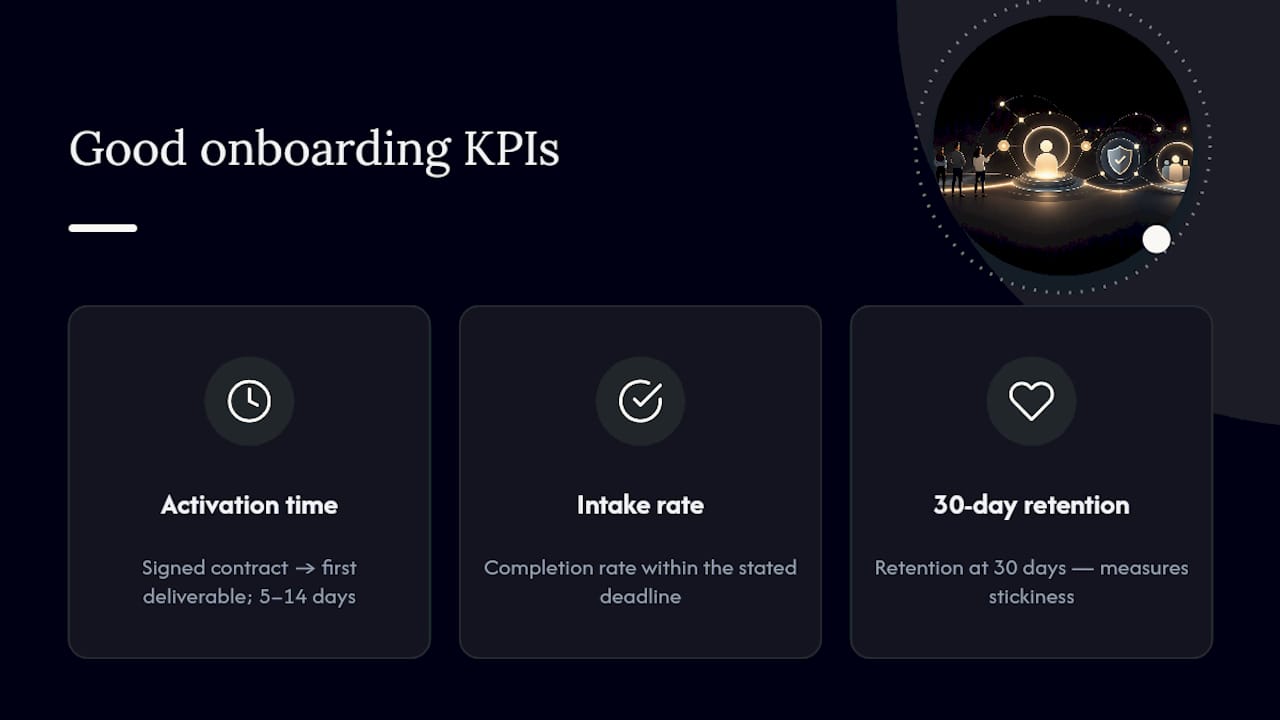
Set a small number of KPIs tied directly to the checklist phases: time-to-activation (from signed contract to first deliverable), intake completion rate within the stated deadline, and 30-day retention. These three numbers, tracked together, tell you both how fast onboarding runs and how well it holds up once the client is live. Measuring speed alone can hide problems. A client who activates in three days but churns at 30 days didn’t have a fast onboarding process. They had a rushed one.
Set a target range rather than a single number, since project complexity varies. A simple landing page might activate in 5 days. A full digital-systems build might reasonably take 14. What matters is that the range is defined ahead of time, so both your team and the client know what “on track” looks like.
Review these KPIs quarterly, not just per-client. Patterns that don’t show up in a single case, like a specific document type that consistently causes delays, become obvious once you’re looking at ten or twenty onboardings side by side.
Common Client Onboarding Challenges And How To Fix Them
Most onboarding breakdowns trace back to a handful of repeat offenders. Clients go quiet after the kickoff call because no one set an expectation for what happens next. The fix is scheduling the first-week check-in during the kickoff itself, not after.
Documents trickle in slowly because requests were vague or scattered across email threads. Named requests with deadlines, tracked in one place, solve this almost every time.
Scope drifts because the kickoff call covered goals but not boundaries. Spend five minutes of that call explicitly stating what’s out of scope, not just what’s in.
Internal handoffs get dropped because the account manager who ran the sales process isn’t the person delivering the work, and nothing formally transfers context between them. A short internal handoff document, filled out before the client is activated, closes that gap.
Payment delays stall projects because work started before terms were finalized. Requiring a signed contract and payment method before any billable work begins removes this almost entirely, and it’s one of the simplest rules to enforce consistently.
Personalization Strategies For Different Client Types
A one-size checklist works as a baseline, but the best onboarding programs flex slightly by client type without abandoning the core structure.
For solo consultants and coaches, intake can be lighter and the kickoff call often doubles as the discovery session, since there’s no internal team to hand off to. For small teams and agencies, the internal handoff phase matters more, since multiple people need context before work starts. For wellness brands and creators, instant-value assets in the welcome phase tend to land better when they’re personal, a short welcome video works better than a generic PDF.
Enterprise or multi-stakeholder clients need an extra step: identifying who the actual decision-maker is separate from the day-to-day contact, since intake answers from the wrong person can send the whole project in the wrong direction.
The checklist phases stay the same across all of these. What changes is depth, tone, and who’s involved at each step, not the sequence itself.
Compliance And Data Privacy During Onboarding
Onboarding is often the point where a business collects the most sensitive client information in the shortest time, which makes it worth treating carefully. Documents like signed contracts, payment details, and account credentials all count as sensitive data, and how you collect them matters as much as what you collect.
Never request passwords or account credentials over plain email. Use encrypted upload tools or a password manager with shared-access features instead. Limit intake form fields to what you genuinely need. Every extra field is one more piece of data you now have to secure and retain responsibly.

If your business operates under any data protection framework relevant to your clients, make sure your intake and document storage practices align with it, and be transparent with clients about where their information is stored and who has access. A short line in your welcome email, stating how documents are stored and secured, builds more trust than any amount of marketing language ever could.
A Practical Note On Getting Started
Start smaller than you think you need to. A five-step checklist that your team actually follows beats a fifteen-step one that gets skipped under deadline pressure. Run it with a handful of real clients, watch where people hesitate or ask the same question twice, and adjust from there.
Automation should earn its place gradually too. Automate the reminders first, since those are low-risk. Keep the kickoff call and any negotiation fully human for as long as it takes to build confidence in the rest of the system. Try the checklist above on your next client, track time-to-activation and intake completion, and let those two numbers tell you what to fix next.
— Christopher
Ready To Build This Into Your Own Systems?
Running this checklist manually works fine for a handful of clients. Past that, the admin catches up with you fast, and that’s usually where automation consulting or a purpose-built client portal starts paying for itself. If you’d rather have someone set up the templates, portal, and automation flows for you instead of building them from scratch, Moderate Murmurations offers a free consultation to map your onboarding process onto a working system, whether that’s a new website, a client portal, or the AI workflows behind it. For teams building AI-assisted automation into their own onboarding, AmmarAI’s guide to productivity workflows is worth a look as well.
A Few More Places To Look
Zapier’s client onboarding checklist lays out the core six-step consensus in template form. OnboardMap’s playbook goes deeper on portal-based automation. Ditch Manual’s interactive checklist is useful for professional services firms specifically. HubSpot’s template library gives you ready-made documents to adapt immediately.
Sources
- Client Onboarding Guide 2026: The Complete Playbook + Free Templates | OnboardMap
- The client onboarding checklist every professional services firm needs (free + interactive) | Ditch Manual
- The 6-step client onboarding checklist (with template) - Zapier
- Free Customer Onboarding Templates | HubSpot