AI Training for Small Businesses: A Practical Rollout Guide
AI Training for Small Businesses: A Practical Rollout Guide

For small businesses, AI training means configuring tools like Microsoft 365 Copilot, Google Gemini, OpenAI GPT-4o, and Anthropic Claude to work with your specific content, site, and workflows. It is not a machine learning degree. The fastest next step is a focused pilot using few-shot prompting or retrieval-augmented generation (RAG), before you consider anything more complex.
Here is where to start:
- Run a friction audit first. Identify one repetitive task that costs your team real time each week.
- Test few-shot prompting. Write three to five examples of your ideal output and feed them to GPT-4o or Claude before spending anything on infrastructure.
- Add RAG when you need live facts. Connect your site docs or knowledge base so the model answers from your actual content.
- Reserve fine-tuning for later. It requires substantial labeled data and ongoing maintenance. Most small businesses never need it.
- Get managed help when the pilot must scale. Moderatemurmurations handles the move from working prototype to production-ready integration.
Key Takeaways
Configuring AI tools to work with your specific content and workflows delivers faster results than any off-the-shelf solution, and most small businesses reach their target outcome with few-shot prompting plus RAG alone.
| Point | Details |
|---|---|
| Start with a friction audit | Identify one high-frequency task before choosing any tool or layer. |
| Test few-shot before building | Validate your use case with examples before spending on RAG or fine-tuning. |
| RAG costs $5,000–$30,000 | Fine-tuning runs $15,000–$100,000+; most small businesses never need it. |
| Assign a workflow owner | One person must own evals, re-indexing, and escalation for each AI feature. |
| Moderatemurmurations manages the build | Handles RAG setup, prototype integration, staged rollout, and ongoing ops support. |
Table of Contents
- What does AI training actually cover for your website and workflows?
- Which option fits your business right now?
- A practical 6-step implementation checklist
- What you need to know about data, privacy, and security
- How to measure success and keep your AI feature running
- How to evaluate vendors before you hire one
- Three short pilot examples
- What actually matters more than the tools you pick
- Ready to move from pilot to production?
- Sources
What does AI training actually cover for your website and workflows?
The term “AI training” covers three distinct layers, and most small businesses only need the first two.
Layer 1: Plug-and-play widgets. These are pre-built chat tools, form assistants, and content suggestion features you embed with a script tag. Setup takes hours, not weeks. They suit businesses that want a visible AI feature quickly without touching an API.
Layer 2: API integrations and RAG pipelines. You connect a model like GPT-4o or Gemini to your own content through an API, then build a retrieval layer so the model pulls answers from your site docs, product pages, or knowledge base. According to practical site-integration guidance, data preparation is often the largest cost in these projects, so organizing your content before you build saves significant time.
Layer 3: Custom fine-tuning. Fine-tuning further trains a base model on domain examples to change tone or behavior. It requires hundreds to thousands of labeled examples and does not add live factual knowledge. RAG handles live facts; fine-tuning handles style and structure.
Concrete use cases for the audience this article is written for:
- Wellness brand: FAQ chat trained on your service descriptions and intake policies, so clients get accurate answers at 11 PM without a staff member on call.
- Creator: Landing page copy that personalizes by traffic source, using your existing brand voice examples as few-shot context.
- Service provider: An internal Copilot that drafts proposals and status reports from a template you define, cutting first-draft time significantly.
- Small team: Microsoft 365 Copilot configured for drafting, meeting summaries, and data analysis across your existing Microsoft 365 documents.
Which option fits your business right now?
The right approach depends on four factors: how often the task runs, whether you need live facts, how consistent the output format must be, and what your budget allows.
- If you need live, up-to-date answers from your own content → build a RAG pipeline. RaftLabs puts RAG projects at $5,000–$30,000 and 2–6 weeks, making it the practical first step for most service businesses.
- If you need a cheap, fast test → start with few-shot prompting. Cost is essentially zero beyond API usage, and you can validate the concept in days.
- If you need structural consistency at high volume → consider fine-tuning. RaftLabs estimates fine-tuning at $15,000–$100,000+ and 9–24 weeks, so the business case needs to be clear before you commit.
- If your team needs to own the workflow, not just use a tool → invest in role-based training alongside any technical build.
Business deployment evidence shows that small firms typically reach 80–90% of their target outcome with few-shot prompting plus RAG. Fine-tuning is a last resort, not a starting point.
A practical 6-step implementation checklist
Step 1: Discovery and friction audit (Week 1). Map your highest-friction, highest-frequency tasks. Deliverable: a short list of three to five candidates ranked by time cost and data availability.
Step 2: Pick the feature and layer (Week 1–2). Choose one task and one layer. Avoid scope creep at this stage. Deliverable: a one-page brief with the chosen use case, data sources, and success metric.
Step 3: Prepare your data and knowledge base (Weeks 2–4). Clean, organize, and label your content. For RAG, this means chunking documents and setting up a vector store. For few-shot, this means writing and testing example pairs. Deliverable: a structured dataset or indexed knowledge base.

Step 4: Build a prototype (Weeks 3–5). Run few-shot tests or a small RAG build. Measure against your success metric before integrating anything into a live site. Deliverable: a working demo with documented eval results.
Collect real feedback before full launch. Deliverable: a staged deployment with a rollback plan.
Step 6: Measure and iterate (Ongoing). Track your chosen KPI weekly for the first month, then monthly. Schedule a re-index or prompt refresh every 60–90 days. Deliverable: a live dashboard and a documented ops cadence.
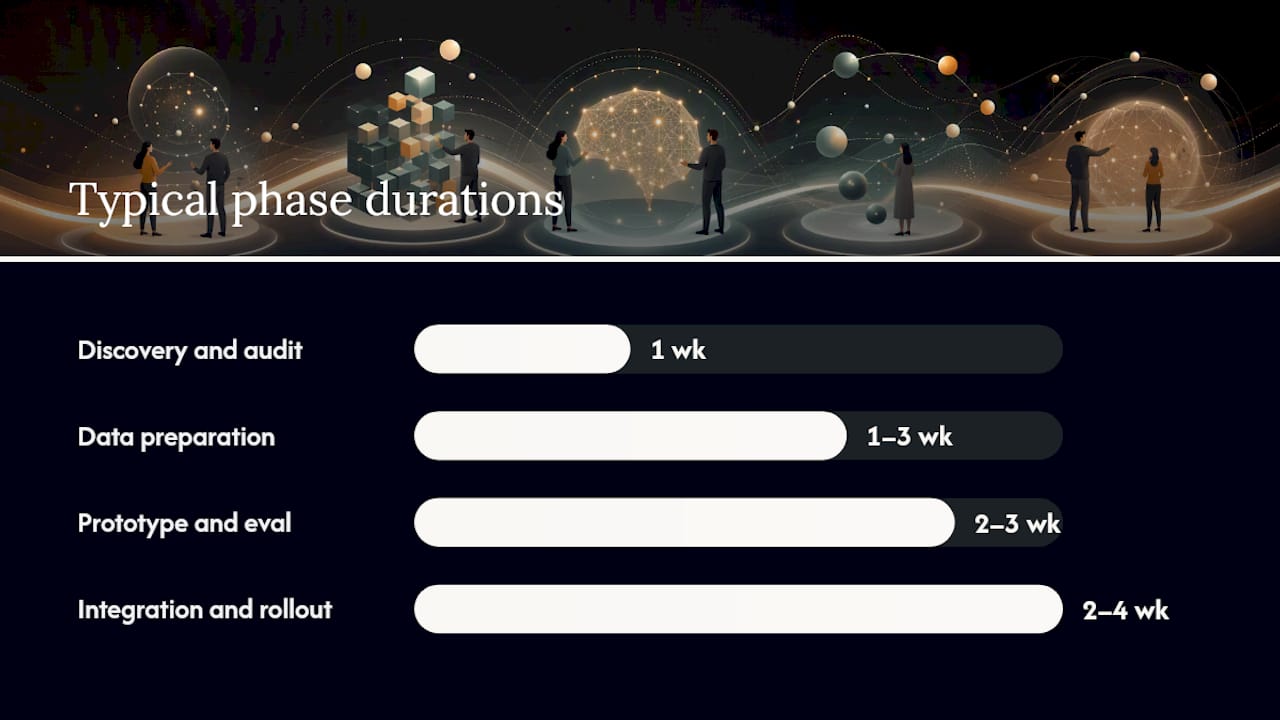
| Phase | Typical Duration | Key Deliverable |
|---|---|---|
| Discovery and audit | 1 week | Prioritized use-case list |
| Data preparation | 1–3 weeks | Indexed knowledge base or labeled dataset |
| Prototype and eval | 2–3 weeks | Working demo with eval results |
| Integration and staged rollout | 2–4 weeks | Live feature with rollback plan |
| Measurement and iteration | Ongoing | KPI dashboard and ops schedule |
Pro Tip: *Test your few-shot examples against at least 20 real inputs before building any infrastructure.
What you need to know about data, privacy, and security
Sending customer data to an external API carries real risk. Before you connect anything, work through this checklist.
- Redact or pseudonymize PII before it leaves your system. Names, emails, health details, and payment information should never appear in a raw API call. Use a preprocessing step to strip or replace identifiable fields.
- Review the vendor’s data retention policy. OpenAI, Google, Anthropic, and Microsoft each have different defaults for how long they store API inputs. Read the terms, not just the marketing page.
- Confirm data ownership in writing. Your training examples and fine-tuned model weights should belong to your business, not the vendor.
- Ask for the subprocessor list. Vendors often route data through third-party infrastructure. Know who touches your data.
- Require breach notification timelines. U.S. state laws vary, but your contract should specify notification within 72 hours of a confirmed breach.
- Apply least-privilege credentials. API keys should have only the permissions the integration actually needs. Rotate them quarterly.
- Verify encryption in transit and at rest. Ask for SOC 2 Type II documentation or equivalent before signing any contract for a production integration.
How to measure success and keep your AI feature running
Good KPIs depend on the use case, but these four cover most small-business scenarios.
Support chat: First-contact resolution rate and ticket volume reduction.
Content personalization: Conversion lift on the personalized variant versus the control. Even a modest lift justifies the RAG build cost at reasonable traffic volumes.
Internal Copilot: Hours saved per week on drafting, summarizing, or formatting. Track this at the team level, not just individually.
Extraction or classification tasks: F1 score against a labeled test set. Run this eval every time you update the model or re-index the knowledge base.
Metacto’s workflow-ownership framework adds an important operational layer: tag every human edit with a reason code (“wrong tone,” “factual error,” “missing context”) so corrections become improvement data rather than silent fixes. Review those tags monthly and use them to update your prompts or re-index your knowledge base.
Schedule a full eval and re-index every 60–90 days. Assign one person as the workflow owner for each AI feature. That person reviews error logs, approves prompt changes, and decides when to escalate to a developer.
How to evaluate vendors before you hire one
The right vendor shows their work. Ask these questions before signing anything.
- Show me a delivered project similar to mine. Vague case studies with no metrics are a red flag.
- How is my data handled, stored, and deleted? If the answer is unclear or deferred, walk away.
- What does your eval plan look like? A vendor without a test set and acceptance criteria is guessing.
- How do you handle staging and rollback? Production deployments need a tested rollback path.
- Is pricing fixed, per-query, or retainer-based? Understand the cost model before the build starts.
Red flags to watch for: no role-based curriculum, no case studies with measurable outcomes, vague answers about data security, and no plan for human validation. NovoCircle’s Copilot Foundations program is a useful benchmark: eight hands-on sessions built around real company documents, with a clear progression from setup to deployed capability.
Your contract should specify delivery milestones, acceptance criteria for each phase, data deletion on termination, and a defined support period after launch.
Three short pilot examples
Wellness brand, RAG-powered FAQ chat. A small yoga studio embedded a RAG chat widget trained on its class descriptions, cancellation policy, and intake forms. Bounce rate on the FAQ page dropped noticeably, and the front-desk team fielded fewer repeat questions about scheduling. The build took four weeks, including two weeks of content organization.
Solo creator, API-driven landing page personalization. A freelance copywriter used GPT-4o with few-shot examples drawn from her best-performing emails to generate personalized landing page variants by traffic source. She refreshed the examples quarterly rather than rebuilding the integration, keeping ongoing costs near zero.
Service provider, internal Copilot for proposals. A small consulting firm configured Microsoft 365 Copilot using the Microsoft Learn workflow path and a set of proposal templates. First-draft time for standard proposals dropped from two hours to under 30 minutes. The adoption lesson: the team needed two training sessions on reviewing and editing AI output before they trusted the drafts enough to use them consistently.
What actually matters more than the tools you pick
Most small businesses spend too much time choosing between GPT-4o and Gemini and too little time deciding who owns the workflow after the build is done. The tool matters less than the process around it.
Metacto makes this point directly: teams need training on context-setting, review, escalation, and measurement, not just prompt writing. A team that understands why an output is wrong and knows how to tag and escalate that failure will improve faster than a team with a better model but no feedback loop.
The other thing most guides understate is maintenance. A RAG pipeline that is not re-indexed when your content changes will start giving wrong answers within weeks. An internal Copilot that nobody reviews will drift from your brand voice without anyone noticing. Build the ops cadence into the project from day one, not as an afterthought.
When Moderatemurmurations recommends a managed engagement over an in-house pilot, it is usually because the business has a clear use case, limited internal bandwidth to run evals, or a live site where a bad output carries real reputational risk. For those situations, a managed build with a defined rollback plan is worth the cost. For a low-stakes internal tool, an in-house pilot with a few-shot test is the right starting point.
Ready to move from pilot to production?
Moderatemurmurations builds the AI features your business actually needs: RAG-powered site chat, personalized landing pages, internal Copilot setup, and the AI workflow design that keeps everything running after launch. You get hands-on, role-based workshops, a working prototype, a staged rollout, and ongoing ops support, without hiring a full development team or signing a long-term retainer.

The first consultation is free. We scope the project, identify your highest-value use case, and give you a clear timeline and outcome estimate before any work begins. Book your free consultation and leave with a plan you can act on immediately.
Sources
These resources are worth bookmarking depending on where you are in the process.
- Transform business workflows with generative AI - Training | Microsoft Learn
- What Is Fine-Tuning in AI? A Practical Explainer | UnifyAI
- RAG vs fine-tuning: when to use each for business AI — RaftLabs
- AI Training for Business Teams: How to Teach Workflow Ownership, Not Prompt Tricks | Metacto
- Copilot Foundations — NovoCircle