AI for Small Business: A Practical Pilot Plan for Owners
AI for Small Business: A Practical Pilot Plan for Owners

AI can reclaim hours every week, automate repetitive admin, and lift your marketing output — and the fastest way to start is a focused two-week pilot on one task you already do manually. The SBA advises small businesses to treat AI as a capacity multiplier: a practical response to labor shortages and rising costs, not a wholesale replacement of your team. Tools like Google Workspace with Gemini, ChatGPT Work, and implementation partners like Moderatemurmurations make that first step concrete and low-risk.
Start here — your three-step launch checklist:
- Choose one workflow to automate — pick the task that costs you the most time each week (email follow-ups, invoice reminders, social captions).
- Pick one training resource — Grow with Google’s AI program, OpenAI’s ChatGPT for Small Business workshops, or a Coursera certificate are all free or low-cost.
- Run a two-week pilot — set a simple success metric (time saved, response rate), test the workflow, and measure before you scale.
Table of Contents
- What can AI actually do for your small business?
- Where should you learn AI skills that actually transfer?
- Which AI tool categories should you actually care about?
- How do you run your first AI pilot without wasting time or money?
- Starter prompts and workflows you can use today
- What privacy and legal rules apply to U.S. small businesses using AI?
- What do real workshop outcomes look like?
- Key Takeaways
- Why the “just use AI” advice misses the point
- Moderatemurmurations builds your AI pilot for you
- Useful sources and further reading
What can AI actually do for your small business?
The honest answer: quite a lot, depending on where your time goes. Here is a function-by-function breakdown of where small business AI creates immediate, measurable value.
Marketing
AI generates first-draft ad copy, email subject lines, and social captions in seconds. You feed it your product, audience, and tone; it returns three to five variations you can test. Content repurposing is the hidden win: paste a blog post into ChatGPT Work or Gemini and ask it to produce an Instagram caption, a LinkedIn summary, and a newsletter intro from the same source.
Quick prompt example: “You are a brand copywriter for [business name]. Write three Facebook ad headlines for [product], targeting [audience], with a friendly and direct tone. Keep each under 10 words.”
Sales
AI drafts personalized outreach emails, qualifies leads against a set of criteria you define, and automates follow-up sequences so no prospect goes cold. CRM enrichment — pulling public data about a contact and summarizing it before a call — is one of the fastest wins for solo founders.
Quick prompt example: “Summarize this LinkedIn profile in three bullet points: what they do, what they likely need, and one relevant question I could open with.”
Customer service
A simple AI chatbot handles FAQs, collects intake information, and routes complex issues to a human. Even without a custom-built agent, you can use a tool like Claude or ChatGPT Work to draft auto-responses to common support tickets in your brand voice, cutting response time from hours to minutes.

Operations
Appointment scheduling, order status updates, and inventory alerts are all automatable with today’s no-code platforms. An AI agent for small teams can monitor a shared inbox, detect appointment requests, and add them to a calendar without human intervention.
Finance
AI can categorize expenses from receipts, generate a quick P&L narrative from a spreadsheet, and run cash-flow scenarios (“What happens to my runway if revenue drops 20% for two months?”). These are prompts you run inside ChatGPT Work or Gemini, not complex integrations.
HR and hiring
Job description drafts, candidate screening templates, and onboarding checklists are all tasks where generative AI saves two to four hours per hire. Feed the tool your role requirements and ask it to draft a structured interview guide with scoring criteria.
| Business Function | AI Use-Case | Time Saved (typical) |
|---|---|---|
| Marketing | Copy drafts, A/B variations, repurposing | 3–4 hrs/week |
| Sales | Outreach drafts, lead qualification | 2–4 hrs/week |
| Customer service | FAQ responses, ticket triage | 2–6 hrs/week |
| Operations | Scheduling, reminders, status updates | 3–6 hrs/week |
| Finance | Expense categorization, P&L summaries | 1–3 hrs/week |
| HR | Job descriptions, onboarding docs | 2–4 hrs/hire |
Where should you learn AI skills that actually transfer?
Three programs stand out for U.S. small business owners who want practical skills, not theory.
Grow with Google and the Google AI Professional Certificate
Grow with Google’s AI hub offers free workshops, coaching sessions, and a Google AI Professional Certificate hosted on Coursera. Completing the certificate gives you hands-on activities inside Google Workspace Business Standard, including Gemini and Gemini Notebook. Gemini Notebook is particularly useful for synthesizing research, drafting reports, and organizing project notes without switching apps.
Best for: Solo founders and small teams who already use Gmail, Google Docs, or Google Drive and want embedded AI without adding new software.
Time and cost: The certificate takes roughly a few weeks at a few hours per week; the Grow with Google workshops are free.
OpenAI’s ChatGPT for Small Business program
OpenAI’s small business program includes virtual training webinars, in-person academies, step-by-step guides, and access to agent workflows and partner integrations. The program is built around hands-on practice: participants build a working AI workflow during the session, not just watch slides.
Best for: Business owners who want structured, cohort-style learning with real deliverables and peer accountability.
Time and cost: Individual workshops run a few hours; in-person academies vary by city. Most sessions are free or low-cost.
Coursera AI courses and Google-backed certificates
Coursera’s AI for small business resources include practical articles, no-code learning paths, and the same Google AI Professional Certificate available through Grow with Google. The platform lets you audit many courses for free and pay only for the certificate.
Best for: Non-technical operators who prefer self-paced learning and want a credential they can reference with clients or partners.
| Program | Cost | Time Commitment | Best For |
|---|---|---|---|
| Grow with Google AI Certificate | Free | A few weeks, a few hrs/week | Teams using Google Workspace |
| OpenAI Small Business Academies | Free/low-cost | Half-day to full-day sessions | Hands-on, cohort learners |
| Coursera AI courses | Free to audit; fee for certificate | Self-paced | Non-technical, solo learners |
Pro Tip: Pair any certificate program with a live pilot. The fastest learners run a real workflow during or immediately after training — not two months later.
Which AI tool categories should you actually care about?
The tool market is crowded. Cutting through it means matching the category to the job, not chasing the newest feature.
The five categories that matter for most small businesses:
- Generative content tools (ChatGPT Work, Gemini, Claude): drafting, editing, repurposing, and summarizing text and images. Start here.
- AI agents and assistants: tools that take actions on your behalf — scheduling, sending emails, updating records. Claude for Small Business and platforms like Arahi offer one-click integrations and explicitly state they do not train their models on your customer data, which matters when you are submitting proprietary records.
- Workflow automation builders: no-code platforms that connect your apps and trigger actions based on events (a new form submission, an invoice received, a calendar event). These sit between your tools and make AI outputs useful in context.
- Analytics and insights tools: platforms that surface patterns in your sales data, customer behavior, or ad performance without requiring a data analyst. Microsoft’s AI resources for small businesses cover integration with Microsoft 365 apps, which many small teams already use.
- Voice and transcription tools: meeting transcription, call summaries, and voice-to-text for notes. These recover time from every meeting and client call.
How to pick the right tool:
- Does it integrate with what you already use (QuickBooks, Shopify, Gmail, Outlook)?
- Does the vendor explicitly state it will not train its models on your data?
- Can a non-technical person set it up in under an hour?
- Is the pricing model predictable (monthly seat vs. usage-based tokens)?
Pro Tip: For small teams without in-house engineering, a bundle-first approach — one platform that provides an agent builder, a chat assistant, and a personal assistant — delivers faster results than stitching together five single-purpose tools.
How do you run your first AI pilot without wasting time or money?
A focused six-to-ten-week pilot is the lowest-risk path to a real result. Here is the plan.
-
Week 0–1: Pick one task and define success. Choose the single highest-hour repetitive task in your business. Write down what “success” looks like in measurable terms: time saved per week, response rate improvement, or number of drafts produced per hour. Assign one owner.
-
Week 2–3: Choose your tool and build the minimum workflow. Select one tool from the category that matches your job (see the section above). Complete one training module. Build the simplest version of the workflow — no integrations yet, just the core prompt or automation. Test it with real but non-sensitive data.
-
Week 4–6: Measure, iterate, and collect feedback. Run the workflow daily. Track your success metric. Adjust prompts or automation logic based on what breaks. Ask one or two team members or customers for honest feedback on the output quality.
-
Week 7–10: Scale, integrate, and document. Once the workflow produces consistent results, connect it to your existing tools (CRM, email platform, calendar). Write a one-page SOP so anyone on your team can run it. Plan your next pilot. For a deeper adoption roadmap, the AI adoption guide for small business owners walks through readiness assessment and scaling in detail.
Pilot cost bands:
- Free to $500: Use free tiers of ChatGPT, Gemini, or Claude; complete a free Grow with Google workshop; build one prompt-based workflow manually.
- $500–$2,500: Upgrade to a paid plan (ChatGPT Work, Claude Pro, or a no-code automation platform); run a structured pilot with a defined scope and KPIs.
- $2,500+: Engage a specialist (like Moderatemurmurations) to scope, build, and document a multi-workflow implementation with integrations.
Pilot checklist:
- Define one success metric before you start
- Assign one owner for the pilot
- Use non-sensitive or anonymized data during testing
- Document what works in a short SOP
- Review results at week six before committing to scale
Starter prompts and workflows you can use today
Copy these directly into ChatGPT Work, Gemini, Claude, or your automation builder. Adapt the bracketed fields to your business.
Marketing and content:
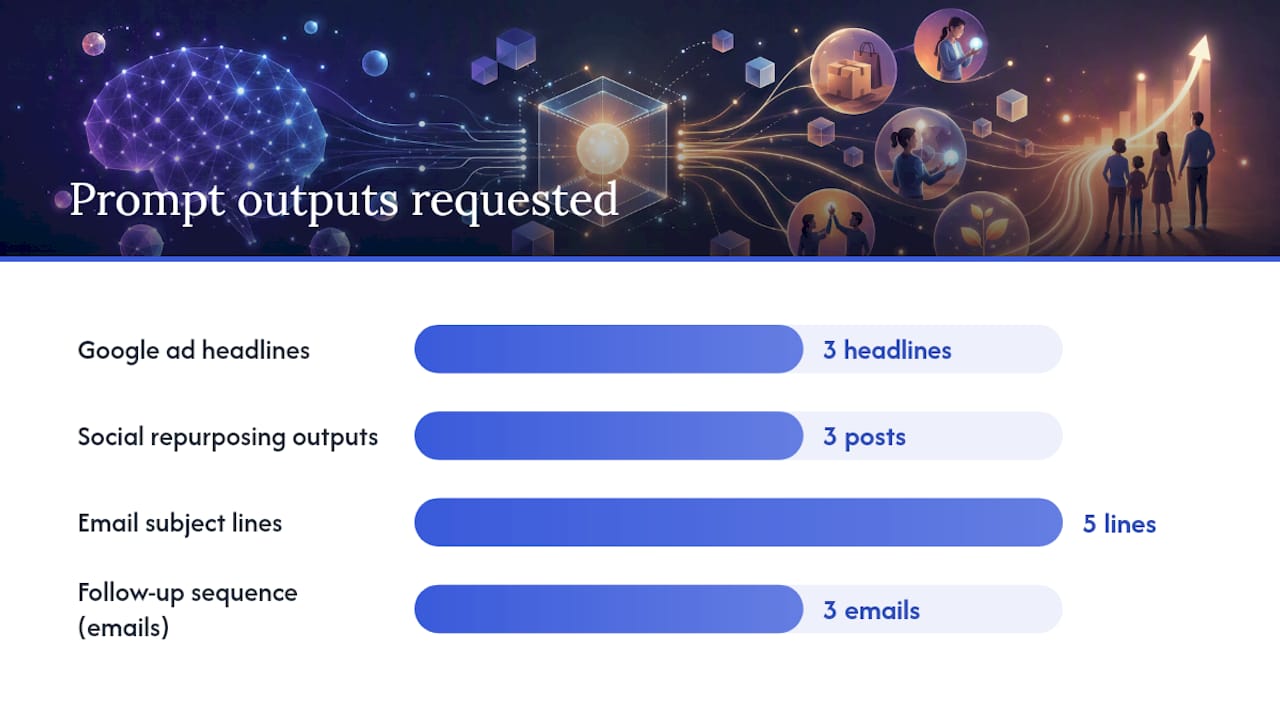
- Ad copy: “Write three Google ad headlines for [product/service], targeting [audience], emphasizing [key benefit]. Keep each under 30 characters.”
- Social repurposing: “Turn this blog post excerpt into a LinkedIn post (150 words), an Instagram caption (under 100 words), and a tweet (under 280 characters). Maintain a [tone] voice.”
- Email subject lines: “Generate five email subject lines for a promotional email about [offer]. Avoid spam trigger words. Audience: [describe them].”
Sales and follow-up:
- Outreach draft: “Write a short, personalized cold email to [prospect type] introducing [service]. Reference their likely challenge: [challenge]. Keep it under 100 words.”
- Follow-up sequence: “Write a three-email follow-up sequence for a prospect who attended a free consultation but has not booked. Tone: warm and direct. Space emails three days apart.”
Operations and finance:
- Invoice reminder: “Write a polite invoice reminder email for a payment that is [X] days overdue. Include the invoice number [#], amount [$], and a payment link placeholder.”
- Expense summary: “Here is a list of expenses for [month]. Categorize each into: marketing, software, travel, office, or other. Then summarize total spend by category.”
- Appointment confirmation: “Write a confirmation email for an appointment on [date/time] with [client name]. Include a reminder to bring [documents/items] and a reschedule link placeholder.”
Two sample workflow blueprints:
Workflow 1: Lead qualification to CRM update to follow-up email Trigger: New form submission on your website. Action 1: AI agent reads the submission and scores the lead against your criteria (budget, timeline, fit). Action 2: If qualified, creates a CRM record and tags it “warm lead.” Action 3: Sends a personalized follow-up email using a pre-approved template. Expected output: Qualified leads reach your CRM within minutes; no manual triage needed.
Workflow 2: Invoice receipt to expense categorization to owner notification Trigger: Invoice email arrives in a designated inbox. Action 1: AI reads the invoice, extracts vendor, amount, and date. Action 2: Categorizes the expense and logs it to a shared spreadsheet or accounting tool. Action 3: Sends a Slack or email notification to the owner with a one-line summary. Expected output: Every invoice is logged and categorized within minutes of arrival.
For deeper guidance on writing prompts that produce consistent results, the prompt engineering guide covers context-setting, role instructions, and acceptance criteria in plain language.
Prompt hygiene basics: Always include (1) a role instruction (“You are a…”), (2) explicit context about your business and audience, and (3) a clear acceptance criterion (“Keep it under X words” or “Return only a bulleted list”).
What privacy and legal rules apply to U.S. small businesses using AI?
The short answer: be careful about what data you feed into any AI tool, and read the vendor’s data policy before you start.
Practical rules to follow from day one:
- Do not upload personally identifiable customer data (names, emails, payment details) into a public AI tool unless the vendor explicitly states it will not use that data for training.
- Check whether your vendor offers a Business Associate Agreement (BAA) if you handle health-related data covered by HIPAA.
- Use role-based access controls so only the team members who need AI tool access have it.
- Review all AI-generated content for potential copyright or trademark conflicts before publishing, especially images and longer text passages.
- When using AI in customer-facing interactions (chatbots, auto-responses), disclose that AI is involved — this is increasingly a best practice and, in some contexts, a legal requirement.
Claude for Small Business is one example of a vendor that explicitly states it does not train its foundational models on customer data, which is the kind of policy to look for when submitting proprietary records.
On intellectual property: AI-generated content is not automatically protected by copyright under current U.S. law. Review outputs carefully, especially if you plan to trademark or license them.
Statistic callout: The SBA frames AI adoption as a practical response to labor shortages and rising costs — but explicitly advises small businesses to evaluate both the risks and benefits before committing to any AI tool or workflow.
Pro Tip: During your pilot, use anonymized or synthetic data instead of real customer records. This lets you test the workflow fully without exposing sensitive information to a third-party platform.
For questions about data handling, contracts, or disclosure obligations specific to your industry, consult a qualified attorney rather than relying on vendor marketing copy.
What do real workshop outcomes look like?
The numbers from structured programs are encouraging, and they point to a consistent pattern: short, focused pilots produce results faster than long planning cycles.
OpenAI’s ChatGPT for Small Business program reports that at prior Small Business AI Jams, 78% of participants built a functional AI workflow in a single day, and 42% reported saving more than five hours a week after the event. Those are not enterprise teams with dedicated IT staff. They are small business owners who showed up, followed a structured process, and left with something working.
Grow with Google’s AI training gives participants access to Google Workspace Business Standard during the certificate program, which includes Gemini integrations across Docs, Gmail, and Sheets. Participants gain hands-on experience with real tools, not simulations. The practical outcome: you finish the program with a workflow you can use immediately, not just a certificate.
Platforms like Arahi position their no-code agent builder for teams of 1–50, claiming typical time recovery of 10–20 hours per week per person. That figure comes from vendor positioning, so treat it as a ceiling rather than a guarantee. Most small business pilots recover three to six hours per week in the first month, which is still a meaningful return on a two-week setup investment.
| Program / Platform | Key Metric | What It Means for Your Pilot |
|---|---|---|
| OpenAI Small Business AI Jams | 78% built a workflow in one day | A structured session produces a working result, fast |
| OpenAI Small Business AI Jams | 42% saved 5+ hours/week post-event | Short pilots translate to real weekly time recovery |
| Grow with Google AI Certificate | Hands-on Gemini Workspace access | You leave with a tool already connected to your workflow |
For a broader look at how automation compounds over time, the role of automation in scaling businesses covers ROI patterns and when to add the next layer.
Key Takeaways
The most effective approach to AI for small business is a focused, measurable pilot on one high-hour task, backed by a vetted training program and a clear data privacy policy from your vendor.
| Point | Details |
|---|---|
| Start with one task | Pick the single highest-hour repetitive task and define a measurable success metric before you build anything. |
| Use structured training | Grow with Google, OpenAI’s Small Business program, and Coursera certificates all provide hands-on practice, not just theory. |
| Protect your data | Choose vendors with explicit non-training policies for customer data; use anonymized data during pilots. |
| Measure before scaling | Track time saved, response rates, or output volume for at least four weeks before adding integrations or new tools. |
| Moderatemurmurations as your next step | Moderatemurmurations builds AI-assisted websites, prompt workflows, and digital systems for small businesses ready to move from pilot to production. |
Why the “just use AI” advice misses the point
Most articles about artificial intelligence for small businesses focus on the tools. The real bottleneck is almost never the tool. It is the absence of a defined workflow, a clear success metric, and someone accountable for the result.
The 78% of participants who built a working AI workflow in a single OpenAI academy session did not succeed because the software was easy. They succeeded because the session forced them to pick one specific task, define what “done” looked like, and build toward that target in a structured environment. That constraint is what most self-directed AI experiments lack.
There is also a tendency to overestimate what AI will do autonomously and underestimate what it will do when you give it clear instructions. A well-written prompt with explicit context, a role instruction, and an acceptance criterion will outperform a vague one every time — not because the model is smarter, but because you have removed the ambiguity it would otherwise fill with generic output. The AI workflow design guide covers this in practical terms.
The businesses that get the most from AI in the first six months are not the ones with the biggest budgets. They are the ones that ran a small, honest pilot, measured it, and then made a decision based on what they actually saw.
Moderatemurmurations builds your AI pilot for you
Spending weeks learning a new tool while running your business is a real cost. Moderatemurmurations offers a faster path: done-for-you AI-assisted website design, landing pages, brand copy, and workflow setup built specifically for small businesses, creators, and service providers.

A pilot engagement typically includes scoping your highest-value workflow, building and testing the automation or prompt system, and documenting it so your team can run it independently. The timeline is days to a few weeks, not months. If you are a solo founder, a small team, or a service provider who needs a working AI system without the learning curve, this is built for you.
Start with a free consultation to scope your first pilot. Book your free consultation and leave with a clear plan, whether or not you hire us to build it.
Useful sources and further reading
These are the authoritative resources referenced throughout this article. Each one is worth bookmarking before you start your pilot.
- Manage your business - Small Business Administration
- AI training and tools for small businesses | Grow with Google
- Introducing the ChatGPT for small business program | OpenAI
- Claude for Small Business | Claude by Anthropic
- Boost Small Business Growth and Innovation With AI Tools
- AI for Small Business—Transforming Operations and …
- AI Software for Small Business — Automation Without Hiring | Arahi AI
- Agentfounder — The Autonomous AI Co-Founder