ADA Website Compliance for Website Owners: 2026 Guide
ADA Website Compliance for Website Owners: 2026 Guide

If your website serves the public, whether you run an ecommerce store, a local service business, or a government agency, it almost certainly falls under ADA expectations. The practical standard to follow is WCAG 2.1 Level AA. Start today with three steps: run a dated automated scan, commission a focused manual audit of your core user flows, and publish or update your accessibility statement before doing anything else.
- Run a dated automated scan using a tool like WAVE, axe, or Lighthouse and save the full report with a timestamp.
- Commission a manual audit of your highest-traffic pages and critical user flows (checkout, contact forms, account login).
- Publish or update your accessibility statement on your site and begin a prioritized remediation log.
The DOJ has made its posture clear: ADA guidance recommends practices like alt text, captions, and keyboard access, and courts are actively enforcing these expectations through private litigation.
Pro Tip: Date every scan report and store it in a shared folder your legal counsel can access. A timestamped audit trail is your first line of defense if you receive a demand letter.
Key Takeaways
ADA website compliance requires WCAG 2.1 Level AA as the working standard, backed by dated audit documentation and a prioritized remediation plan.
| Point | Details |
|---|---|
| WCAG 2.1 AA is the standard | Courts, DOJ settlements, and the Title II final rule all point to WCAG 2.1 AA as the compliance benchmark. |
| Automated scans catch only ~25% of issues | Scanners miss context-dependent failures; pair them with manual review and user testing for a defensible audit. |
| Dated documentation reduces legal risk | Save timestamped scan reports, a remediation log, and your accessibility statement to demonstrate good-faith effort. |
| Fix templates first, not pages | Remediating shared templates propagates fixes across every page that uses them, preventing regressions at scale. |
| Moderatemurmurations delivers audit to remediation | The service covers dated scan, WCAG-mapped report, prioritized fixes, and validation for small business websites. |
Table of Contents
- Does ADA website compliance apply to your business?
- Which technical standard should you actually follow?
- What accessibility barriers do users actually run into?
- How do you audit your site for accessibility?
- How do you prioritize fixes and plan remediation?
- What governance policies and vendor contracts do you need?
- What does legal enforcement actually look like?
- Why automated checkers alone are not enough
- How Moderatemurmurations approaches accessibility for small business websites
- Accessibility support built for small business websites
- Authoritative resources for ADA and web accessibility
- Sources
Does ADA website compliance apply to your business?
The ADA divides covered entities into two groups, and both have real obligations online.
Title II covers state and local governments: city websites, public school portals, transit authority apps, county health department pages. If your organization is a government entity, the DOJ’s April 2024 final rule formally adopted WCAG 2.1 Level AA as the technical standard for your web content and mobile apps. Compliance deadlines are staggered by population size. Notably, a 2026 Federal Register notice extended some of those dates, so check the current schedule at ADA.gov’s First Steps resource for your entity’s specific deadline.
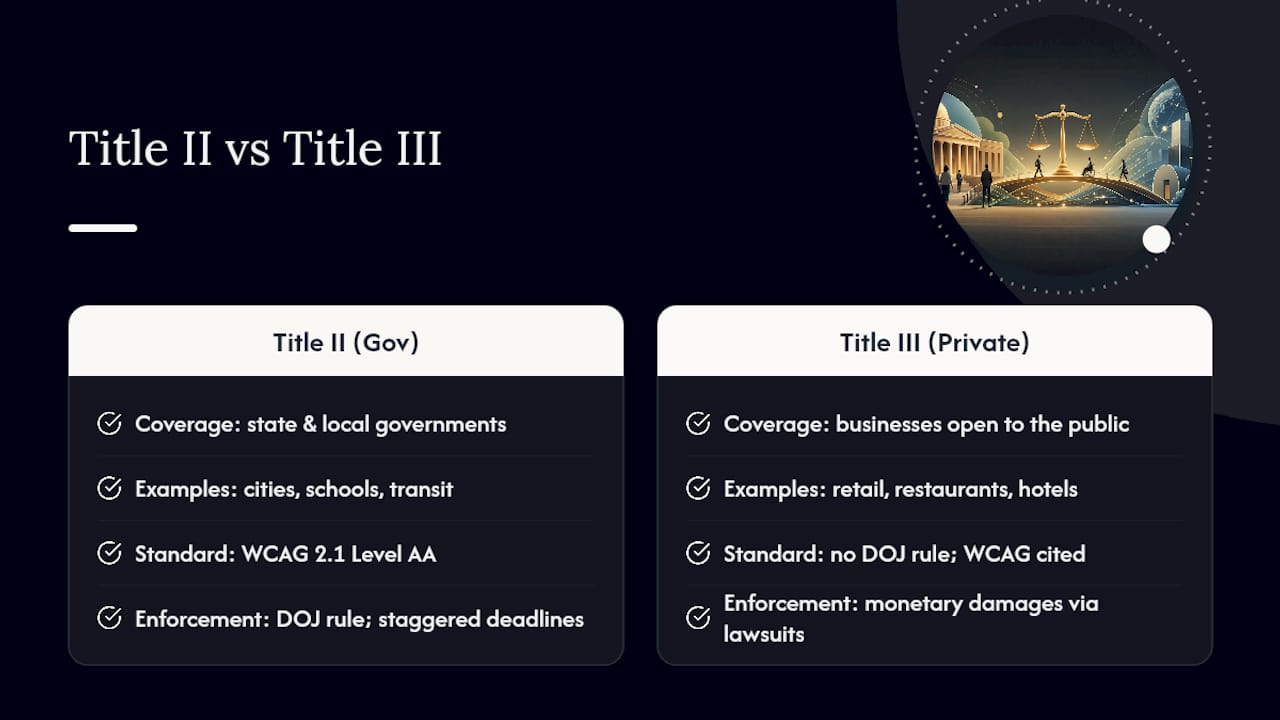
Title III covers businesses open to the public, which courts have consistently interpreted to include websites. Restaurants that take online orders, ecommerce retailers, hotels, healthcare providers, gyms, and professional service firms all fall here. There is no single DOJ technical rule for private businesses equivalent to the Title II rule, but courts and DOJ settlement agreements routinely cite WCAG as the benchmark. The American Bar Association notes that private litigation and state-law claims can expose businesses to monetary damages, making inaction a real financial risk.
Common exceptions and edge cases
A few nuances are worth knowing:
- Archived content: Content that was created before the compliance date and is kept online only for reference, with no active updates, may qualify for an exception under the Title II rule.
- Third-party content: Content posted by third parties that you do not control (user-generated reviews, embedded social feeds) is generally not your direct responsibility, though you should still audit the surrounding page structure.
- Online-only businesses: Some federal circuits apply a “nexus” test, requiring a connection between the website and a physical place of public accommodation. Others do not. The trend in courts is toward broader coverage, so treating your site as covered is the safer position.
- Small entities: The Title II rule includes some scaled requirements for smaller public entities, but there is no blanket small-business exemption under Title III for private companies.
Statistic callout: Private ADA Title III website lawsuits have become one of the most active areas of disability rights litigation in federal courts, with thousands of cases filed annually, according to the ABA’s 2025 analysis.
Which technical standard should you actually follow?
WCAG 2.1 Level AA is the working benchmark for virtually every U.S. website accessibility obligation. The W3C’s Web Content Accessibility Guidelines organize requirements around four principles: content must be Perceivable, Operable, Understandable, and Robust (POUR). Level AA sits between the baseline (Level A) and the most demanding tier (Level AAA), and it covers the failures that most commonly appear in complaints and litigation.
Here is how the legal and technical layers relate:
- The ADA is the law. It prohibits discrimination against people with disabilities but does not itself specify a technical standard for websites.
- WCAG 2.1 AA is the technical standard that courts, DOJ settlement agreements, and the Title II final rule all point to as the measure of compliance.
- Section 508 applies to federal agencies and federally funded programs. It references WCAG 2.1 AA as its technical benchmark, making it effectively the same standard in federal contexts. Section508 publishes practical implementation guides and training resources.
- A conformance claim is only defensible when backed by a dated audit report and validation, not just a passing automated scan. Stating “this site conforms to WCAG 2.1 AA” without documentation is a liability, not a shield.
The practical takeaway: adopt WCAG 2.1 AA as your internal standard, document your audits against it, and reference it explicitly in your accessibility statement. That alignment gives you a defensible position whether you face a DOJ inquiry or a private lawsuit.
What accessibility barriers do users actually run into?
Abstract rules become concrete when you see the specific failures that generate complaints. These are the most common, highest-impact barriers found on business websites:
- Missing or empty alt text: A screen reader user landing on a product image with no alt attribute hears “image” or nothing at all. They cannot evaluate the product.
- Low color contrast: Text that fails the 4.5:1 contrast ratio (for normal text) or 3:1 (for large text) is unreadable for users with low vision, even without a diagnosed disability.
- Unlabeled form fields: A contact form with placeholder text but no programmatic label reads as blank to a screen reader. The user cannot tell what to type.
- Keyboard traps: A modal dialog or date picker that captures keyboard focus and offers no way out forces keyboard-only users to abandon the task entirely.
- Video without captions: Deaf and hard-of-hearing users cannot access video content that lacks synchronized captions. Auto-generated captions without review often contain errors that change meaning.
- Broken ARIA roles: ARIA attributes added incorrectly (a
role="button"on a non-interactive element, or anaria-labelthat contradicts visible text) actively mislead assistive technology rather than helping it. - Poor heading structure: Skipping from H1 to H4, or using heading tags for visual styling rather than document structure, breaks the navigation model that screen reader users rely on to scan a page.
Automated scanners reliably catch missing alt attributes, contrast failures, and some form-label issues. They cannot determine whether alt text is meaningful, whether heading order makes logical sense, or whether a custom widget is actually operable by keyboard. Those judgments require a human reviewer.
How do you audit your site for accessibility?
A credible audit combines three methods, and no single method is sufficient on its own.
-
Automated scanning: Run your site through tools like axe DevTools, WAVE, or Google Lighthouse. These tools flag missing attributes, contrast failures, and structural errors quickly across many pages. Save every report with a date and URL.
-
Manual code and interaction review: A trained reviewer works through each WCAG 2.1 AA criterion that automation cannot assess: keyboard operability of every interactive element, reading order, focus management in modals and menus, meaningful link text, and ARIA correctness. Structure the deliverable as a spreadsheet with columns for issue, WCAG criterion, page URL, severity, and recommended fix.
-
User testing with people with disabilities: Real users with screen readers (JAWS, NVDA, VoiceOver), switch access, or magnification software will surface friction that no automated tool or expert reviewer anticipates. Even two or three sessions with assistive technology users reveal patterns that change your prioritization.
Which pages to include
Do not try to audit every page individually on a large site. Instead, audit by template and by critical user flow:
- Home page and primary navigation
- Product or service listing pages
- Checkout or booking flow (every step)
- Contact and lead-generation forms
- Account creation and login
- Any page with video, audio, or data tables
- Search results and error pages
If your site runs on a CMS with shared templates, fixing the template fixes every page that uses it. That is where to start.
Pro Tip: Pair your automated scanner with a keyboard-only walkthrough of your checkout or contact flow. If you cannot complete the transaction without a mouse, neither can a keyboard user. This single test catches more high-severity issues than most full automated scans.

The 18F Accessibility Guide provides practical checklists and test cases that align with WCAG criteria and work well as a manual review framework.
How do you prioritize fixes and plan remediation?
Not every accessibility issue carries the same risk or effort. Triage by impact before you write a single line of remediation code.
Priority buckets:
- Critical: Blocks task completion entirely. A keyboard trap on checkout, a form with no labels, a login page that screen readers cannot navigate. Fix these within 30 days.
- High impact: Affects many users but does not fully block a task. Low contrast across the site, missing alt text on product images, videos without captions. Target within 90 days.
- Medium: Affects specific user groups or edge cases. Incomplete ARIA on secondary widgets, inconsistent focus indicators on less-visited pages. Plan for 90–180 days.
- Low/cosmetic: Minor structural issues with minimal user impact. Redundant title attributes, minor heading order inconsistencies on static content pages. Address in ongoing maintenance cycles.
A sample 30–90–180 day roadmap
Days 1–30 (Critical fixes):
- Fix all keyboard traps and focus management failures.
- Add programmatic labels to every form field.
- Correct any page where a screen reader cannot complete the primary task.
- Publish your accessibility statement with a contact method for reporting issues.
Days 31–90 (High-impact fixes):
- Resolve contrast failures site-wide, starting at the template level.
- Add meaningful alt text to all product and content images.
- Add synchronized captions to all video content.
- Audit and fix navigation landmark structure (header, main, nav, footer).
Days 91–180 (Medium fixes and governance):
- Remediate ARIA issues on dynamic components (menus, modals, carousels).
- Fix heading hierarchy across secondary page templates.
- Establish a re-scan cadence (quarterly at minimum).
- Update vendor contracts to require WCAG 2.1 AA deliverables.
Start remediation at the template level, not page by page. A fix to a shared navigation component or form template propagates across every page that uses it, preventing the same issue from reappearing as content scales.
When estimating costs, critical fixes on a mid-size site typically require a focused development sprint of one to three weeks. Bringing in an external accessibility consultant for the manual audit phase usually costs less than a single legal settlement. If your site has complex custom components or a large content library, a specialist is worth the investment before you receive a demand letter.
What governance policies and vendor contracts do you need?
Accessibility compliance is not a one-time project. Without governance, every new page, plugin, or redesign can reintroduce the same failures you just fixed.
Policy checklist:
- Assign a named internal owner for accessibility (a developer, product manager, or operations lead).
- Publish an accessibility statement that identifies the standard you target (WCAG 2.1 AA), lists known limitations, and provides a contact method for users to report issues.
- Set a published cadence for re-scanning and re-auditing (quarterly scans, annual full audits at minimum).
- Define a change-management rule: any new template, plugin, or major content type must pass an accessibility check before it goes live.
Vendor and procurement language:
When you hire a developer, designer, or content agency, include contract language that requires WCAG 2.1 AA conformance as a deliverable condition. Specify that the vendor is responsible for remediating accessibility failures in their work within a defined period after delivery. Ask vendors for a Voluntary Product Accessibility Template (VPAT) or equivalent conformance report before accepting a third-party tool or widget.
Training by role:
- Designers: Color contrast, focus states, touch target sizing, and accessible component patterns.
- Developers: Semantic HTML, ARIA usage, keyboard operability, and how to run axe DevTools in the browser.
- Content authors: Writing meaningful alt text, structuring headings, writing descriptive link text, and captioning media.
- Product owners: How to write accessibility acceptance criteria into tickets and how to evaluate third-party tools before procurement.
Train each role at onboarding and refresh annually. Third-party widgets and integrations deserve special scrutiny: a new chat widget or payment processor can introduce keyboard traps or contrast failures overnight. Test every third-party component before it goes live, and keep a record of that test.
Publishing an accessible feedback channel, such as a dedicated email address or an accessible contact form, gives users a way to report issues you missed. It also demonstrates good-faith responsiveness, which matters in any enforcement context.
What does legal enforcement actually look like?
Understanding the enforcement landscape helps you calibrate how much urgency to apply to your remediation timeline.
DOJ enforcement (Title II): The DOJ can investigate complaints against public entities, negotiate consent decrees, and require remediation timelines and third-party monitoring. Consent decrees often include specific WCAG conformance requirements, reporting obligations, and multi-year monitoring periods.
Private litigation (Title III): Any individual can file a federal lawsuit against a private business for an inaccessible website. Remedies are typically injunctive relief (a court order to fix the site) plus attorney’s fees. State laws in California, New York, and Florida, among others, may allow monetary damages on top of federal remedies, which significantly raises the cost of non-compliance.
What plaintiffs typically ask for:
- A court order requiring WCAG 2.1 AA conformance within a set timeline.
- Regular third-party audits with results submitted to the court or plaintiff’s counsel.
- A monitoring period of one to three years.
- Attorney’s fees, which in accessibility cases can reach tens of thousands of dollars even when the underlying remediation is straightforward.
Statistic callout: The ABA’s analysis notes that state-law claims can expose businesses to monetary damages beyond the injunctive relief available under federal Title III, making multi-state businesses particularly vulnerable.
Documentation that reduces your exposure:
- Dated automated scan reports (saved as PDFs with timestamps).
- A written audit report mapping issues to WCAG criteria.
- A remediation log recording each fix: page, issue, criterion, owner, date resolved, and validator.
- Your published accessibility statement with a revision history.
- Vendor contracts requiring WCAG conformance.
Call counsel before you respond to a demand letter. The documents they will request first are your most recent audit report and your remediation log. If those exist and show active progress, your negotiating position is substantially stronger.
Why automated checkers alone are not enough
Accessible.org reports that automated scans typically catch only about 25% of accessibility issues. That figure is consistent with what accessibility practitioners observe: scanners are excellent at detecting the presence or absence of attributes (alt text exists or it does not), but they cannot evaluate quality, context, or intent.
A scanner cannot tell you whether “click here” is a useful link label. It cannot determine whether a chart’s alt text actually conveys the data the chart shows. It cannot evaluate whether a custom dropdown is genuinely operable by keyboard in every browser and assistive technology combination. Those determinations require human judgment.
The exact proportions shift based on your site’s complexity, but the principle holds: automation is a starting point, not a finish line.
Statistic callout: Accessible.org puts automated detection at roughly 25% of total accessibility issues, meaning the majority of failures on any given site require a human reviewer to find.
Pro Tip: When you run a scan, export the results as a dated PDF and log the tool name, version, and URL scanned. That record, combined with a written remediation log, creates the audit trail that matters most if you ever need to demonstrate good-faith compliance efforts.
Pairing automation with manual review also catches the ARIA failures that scanners often miss. An accessibility checker vendor’s guidance confirms that automated tools flag common errors but cannot determine meaningful alt text, heading logic, or complex ARIA issues. The Deque guidance reinforces this: combining automated scans with manual testing is the approach that makes remediation sustainable and defensible over time.
How Moderatemurmurations approaches accessibility for small business websites
At Moderatemurmurations, the approach to accessibility follows a clear sequence: audit first, then prioritize, then remediate, then validate, then monitor. We do not skip steps, and we do not treat a passing automated scan as a conformance claim.
For small businesses, the practical challenge is balancing speed and cost against defensibility. A full WCAG 2.1 AA audit on a 50-page site is not the same project as one on a 5,000-page ecommerce platform. We scope the work to the site’s actual risk profile: the pages users visit most, the flows where failures cause the most harm, and the templates that govern the most content.
Christopher, who leads the accessibility and web systems work at Moderatemurmurations, focuses on building accessibility into the development process rather than bolting it on after launch. That means semantic HTML from the start, accessible component patterns in the design system, and a pre-launch checklist that includes keyboard testing and contrast validation. For sites already live, the process starts with a dated scan and a prioritized remediation plan, not a months-long engagement before anything gets fixed.
One transparency note: Moderatemurmurations does not issue government certifications or official conformance stamps. What we deliver is a dated audit report, a prioritized remediation plan, validation testing after fixes are applied, and a monitoring cadence to catch regressions. That is what a defensible compliance posture actually looks like for a small business.
Accessibility support built for small business websites
Getting your site to a defensible accessibility standard does not require a six-month agency engagement. Moderatemurmurations offers a focused, project-based approach: a dated automated scan plus a manual review of your core user flows, a written report mapping issues to WCAG 2.1 AA criteria, a prioritized remediation plan with estimated timelines, and implementation support to actually fix what we find.

The first deliverable, a dated scan with your top 10 issues and an estimated remediation timeline, gives you something concrete to act on immediately. From there, you choose how much implementation support you need. Pricing is project-based, scoped to your site’s size and complexity, with no retainer required.
If you want a clean, accessible website built from the ground up with WCAG 2.1 AA baked in from day one, or if you need a remediation plan for a site that’s already live, book a free consultation and we’ll scope the work together.
Authoritative resources for ADA and web accessibility
These are the primary sources to bookmark, verify, and return to as standards and regulations evolve.
| Resource | What it’s best for |
|---|---|
| Ada | DOJ’s plain-language explanation of ADA obligations for websites; covers both Title II and Title III. |
| Ada | Action steps and compliance timelines for public entities under the April 2024 final rule. |
| Federal Register Final Rule (April 2024) | The regulatory text adopting WCAG 2.1 AA for Title II; essential for public entities and their counsel. |
| Federal Register Extension Notice (2026) | Updated compliance dates for public entities; check this before planning your remediation timeline. |
| Section508 | Federal technical references, training resources, and VPAT guidance; useful for any organization aligning with WCAG. |
| ABA Title III Analysis (2025) | Legal analysis of private litigation risk and risk-mitigation strategies for private businesses. |
| Deque ADA Compliance Guide | Practical implementation advice on auditing, procurement, and sustaining accessibility over time. |
Save these pages and revisit them at least annually. Regulatory guidance and WCAG itself continue to evolve: the W3C has published WCAG 2.2, and WCAG 3.0 is in development. Staying current with the W3C’s WAI standards page puts you ahead of the next compliance cycle before it becomes a legal obligation.
This article provides general information about ADA website accessibility obligations and is not legal advice. Confirm current compliance requirements with a qualified attorney or the relevant primary sources.
This article is general information, not a substitute for advice from a qualified lawyer. Consult a qualified legal professional about your own circumstances before acting on anything here.
Sources
- Guidance on Web Accessibility and the ADA
- Final rule revising Title II to set WCAG 2.1 Level AA as the technical standard (Federal Register)
- Ada
- Digital Accessibility Under Title III of the ADA: Recent Developments and Risk Mitigation Best Practices (American Bar Association)